


About Client
New Zealand’s most awarded mortgage & insurance advisor Global Finance caters to about 1,500+ customers for their mortgage or insurance needs every year so that they can meet their financial goals. Global Finance offers more preference & freedom, with loan approvals from numerous lenders if chosen by the customers. Dealing with a large number of clients & team members, Global Finance was facing issues managing their unstructured data. As Peritos had already been managing their Dynamics environment, we successfully guided and supported Global Finance’s move from saving data from Azure Dataverse to Azure Blob Storage which saved them 1500$ a month.
- https://www.globalfinance.co.nz/
- Location: Auckland, New Zealand
Project Background
Global Finance has been offering smarter loans and insurance since 1999. Working as one of the best mortgage & insurance advisers in NZ, Global Finance helped clients to save on their loans by avoiding unnecessary interest and getting mortgage-free faster. Since the beginning, they have helped some customers become mortgage-free in as little as 7 years rather than the standard 30-year term. Global Finance was already using Dynamics 365 and saving data from Azure Dataverse; moving to Azure Blob Storage has optimized storage for massive amounts of unstructured data.
Scope & Requirement
In the 1st Phase of the Windows Virtual Server Setup, implementation was discussed as follows:
Setting up saving data from Azure Dataverse to Azure Blob Storage to handle large unstructured datasets for Global Finance. Azure Blob Storage helps fulfill enterprise-level requirements for scalable data storage and analysis.
Implement the customer support service model to enable automated requirement gathering forms, email collation on customer records, and automated task creation for customer updates.
Implementation
Technology and Architecture
Technology
The migration was deployed with the below technological component
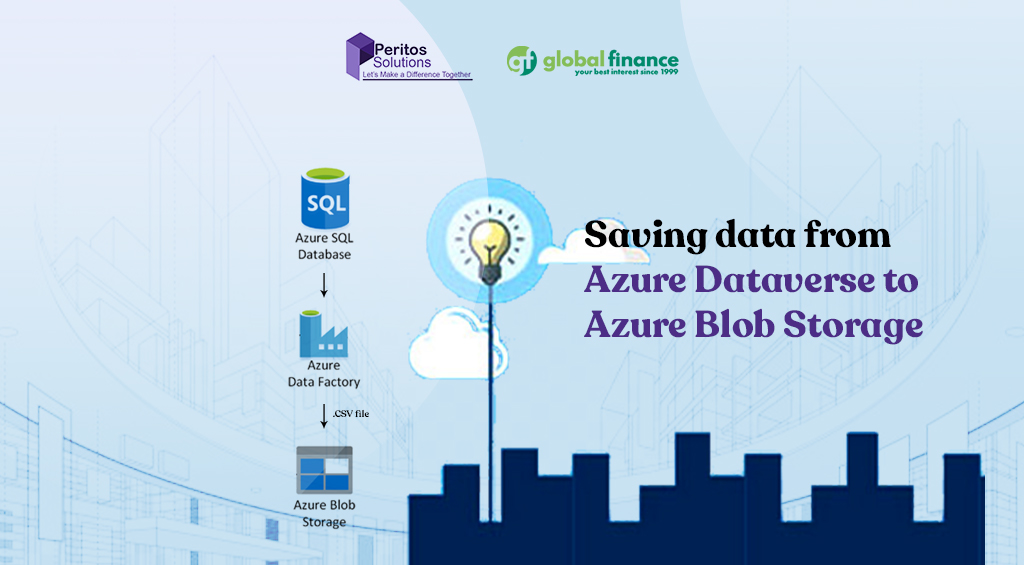
- For Azure Dataverse-The underlying technology used was Azure SQL Database
- For Azure Blob Storage- It supported the most popular development frameworks including Java, .NET, Python & Node.js
- Customer Support service implementation
Security & Compliance:
- Checking data retention requirement
- Checking file sync from On premise to Cloud
- Checking customer is being sent automated email and PDFs from system
- Emails being recorded and added to Dynamics 365 for all interactions
Backup and Recovery
Microsoft Dynamics 365 offers built-in backup and restore capabilities through its native data management features, ensuring business continuity. Automated daily backups and point-in-time restore options provide added security and peace of mind for your critical CRM data.
Network Architecture
The network architecture for Microsoft Dynamics 365 is designed with security in mind, enabling users to remotely access the system only through secure channels such as VPN or conditional access policies, ensuring data protection and compliance. Also there was no connectivity from home as well to avoid any breach of client confidential data.
Cost Optimization
Alerts and notifications are configured in the Azure Cost dashboard configured for client as well as cloudchkr tool. Peritos would send monthly license based invoice adding details and itemized information regarding the cost.
Code Management, Deployment
Cloudformation scripts for deploying data was used for managing the JavaScript and plugin based code.
Challenges of Migrating from Azure Dataverse to Azure Blob Storage
- Data Structure Mismatch: Dataverse stores data in a relational format with rich metadata, relationships, and business logic, while Blob Storage is unstructured, requiring transformation and flattening of data.
- Loss of Metadata & Relationships: Referential integrity, lookups, and entity relationships in Dataverse are not retained in Blob Storage unless explicitly rebuilt or documented.
- Security Model Differences: Dataverse has a detailed role-based access control (RBAC) model; Blob Storage requires separate access controls like SAS tokens, RBAC, or shared access policies, which may require redesigning security.
Support for Dynamics Discounted Licensing
- For all Licenses we implement we provide monthly billing with 20 days credit terms.
- We provide value added services by sending reports to the client on the license usage and last activity date for each user to help them manage their license cost and to get visibility.
Next Phase
- We are also in discussion with other projects for the client
- Dynamics CRM system support
- O365 License Management

About Client
AWS Environment Setup
Tonkin + Taylor is New Zealand’s leading environment and engineering consultancy with offices located globally. They shape interfaces between people and the environment which includes earth, water and air. They have won awards like Beaton Client Choice Award for Best Provider to Government and Community-2022 and IPWEA Award for Excellence in Water Projects for the Papakura Water Treatment Plan-2021.
- https://www.tonkintaylor.co.nz/
- Location: New Zealand
Project Background
Tonkin + Taylor were embarking on the journey for launching a full suite of digital products and chose AWS as their cloud environment. They wanted to create new applications and migrate to cloud services to improve scalability, availability, latency, and cost efficiency. They also aimed to accelerate digital transformation and build SaaS-based offerings. To achieve this, an AWS Environment Setup was required following best practices and compliance standards to serve as a foundation for future applications.
Scope & Requirement
In the first phase of the AWS Environment Setup, implementation was discussed as follows:
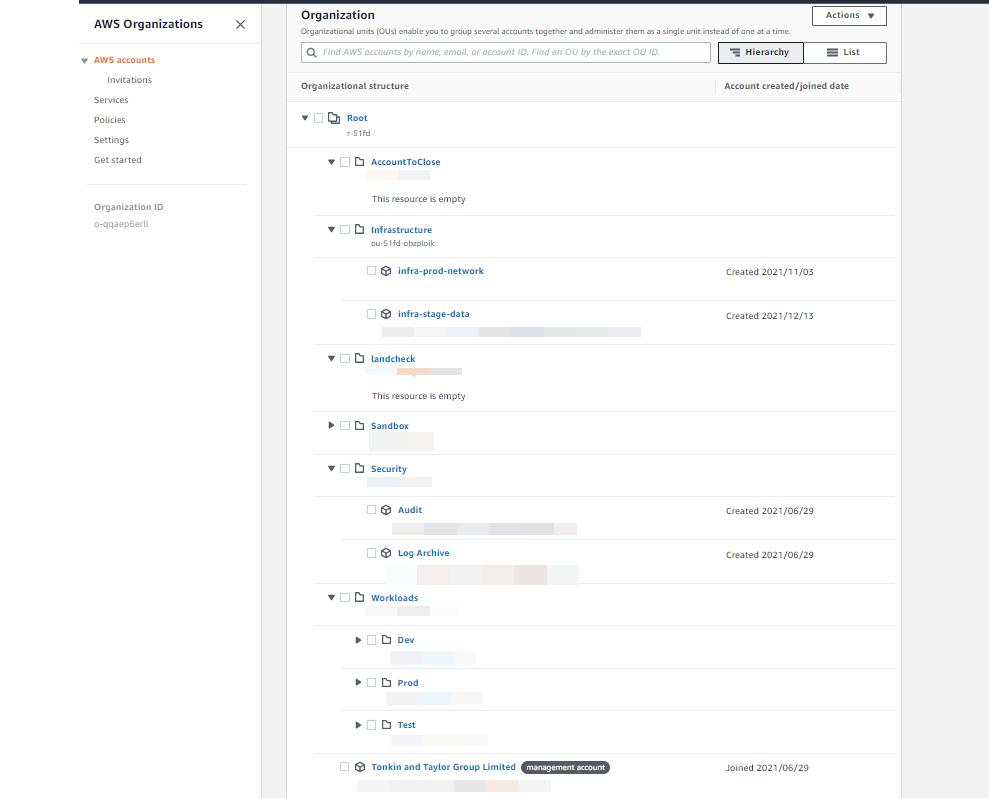
- Setting up AWS environment for multi-account, multi-environment setup.
- Ensuring all AWS accounts follow consistent policies and comply with legal and regulatory requirements.
- Setting up connectivity between AWS accounts and on-premise networks.
- Setting up AWS Security Hub to provide a comprehensive security view.
- On-premise to cloud migration to modernize infrastructure, reduce costs, improve scalability, enhance performance, and ensure business continuity through a secure and reliable cloud platform.
Implementation
Technology and Architecture
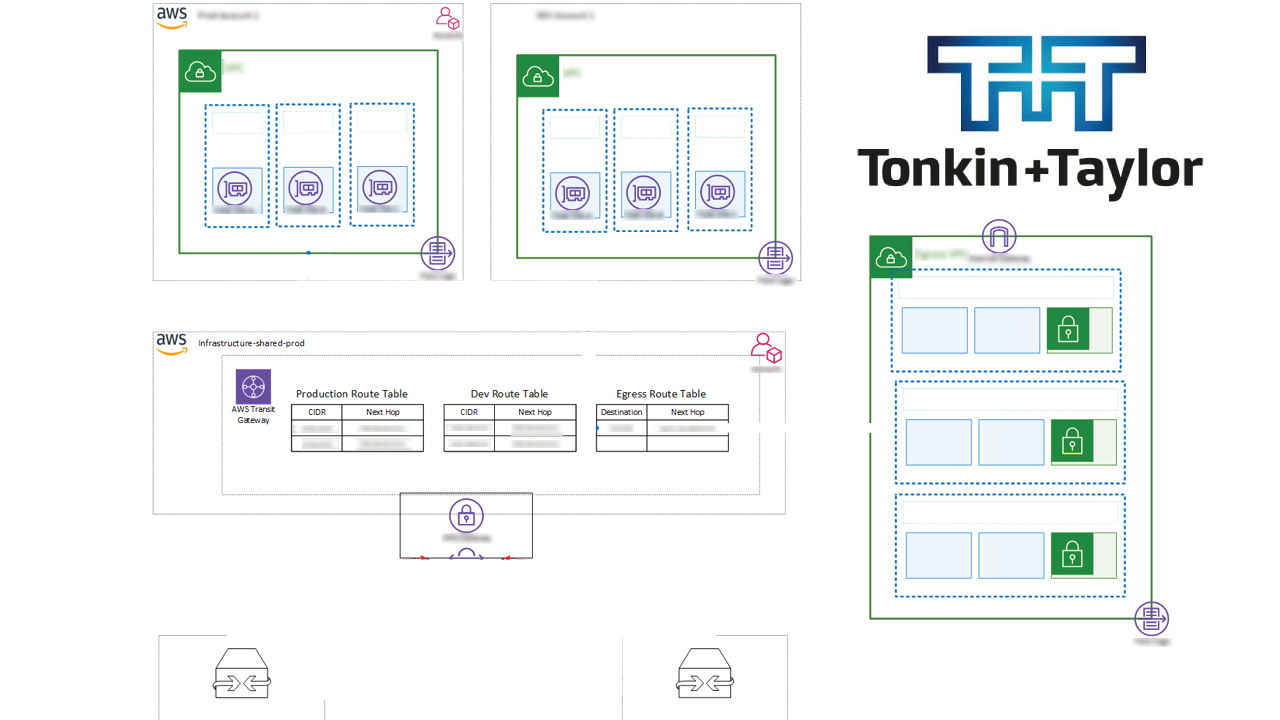
Read more on the key components which defined the Architecture for AWS Environment Setup for Tonkin + Taylor
Technology/ Services used
- We used AWS services and helped them to setup below
- Cloud: AWS
- Organization setup: Control Tower
- AWS SSO for authentication using existing AzureAD credentials
- Policies setup: Created AWS service control policies
- Templates created for using common AWS services
Security & Compliance
- Tagging Policies
- AWS config for compliance checks
- NIST compliance
- Guardrails
- Security Hub
Network Architecture
- Site to Site VPN Architecture using Transit Gateway
- Distributed AWS Network Firewall
- Monitoring with CloudWatch and VPC flow logs
Backup and Recovery
Cloud systems and components used followed AWS’s well-Architected framework and the resources were all Multi-zone availability with uptime of 99.99% or more.
Cost Optimization
Alerts and notifications are configured in the AWS cost
Code Management, Deployment
Cloudformation scripts for creating stacksets and scripts for generating AWS services was handed over to the client
Challenges of AWS Environment Setup
- It was a bit of a challenge to ensure the new environment meets all of the compliance criteria and still remain cost effective.
- As per best practices we need to have a set of Unique machines and each may need to have its own VPC but that may incur a cost to the client. So we discussed and agreed for a specific 75% to be achieved which would be deemed as acceptable.
- We have some non compliance being generated by standard AWS services
- We got feedback from AWS support stating that Control Tower managed artifacts may appear non-compliant in conformance packs, but these are expected and should not be modified or deleted. These are treated as exceptions.
Support
- 1 month extended support
- A template for CloudFormation stack to create more AWS resources using the available stacks
- Screen sharing sessions with demo of how the services and new workloads can be deployed
- Offer support during the initial transition phase post-migration
- Provide ongoing technical support, monitoring, and optimization services
Next Phase
We are now looking at the next phase of the project which involves:
- Launching new digital products with the help of AWS environments which have been set up
- Any ad-hoc change requests for managing the cloud environment
Executive Summary
About Client
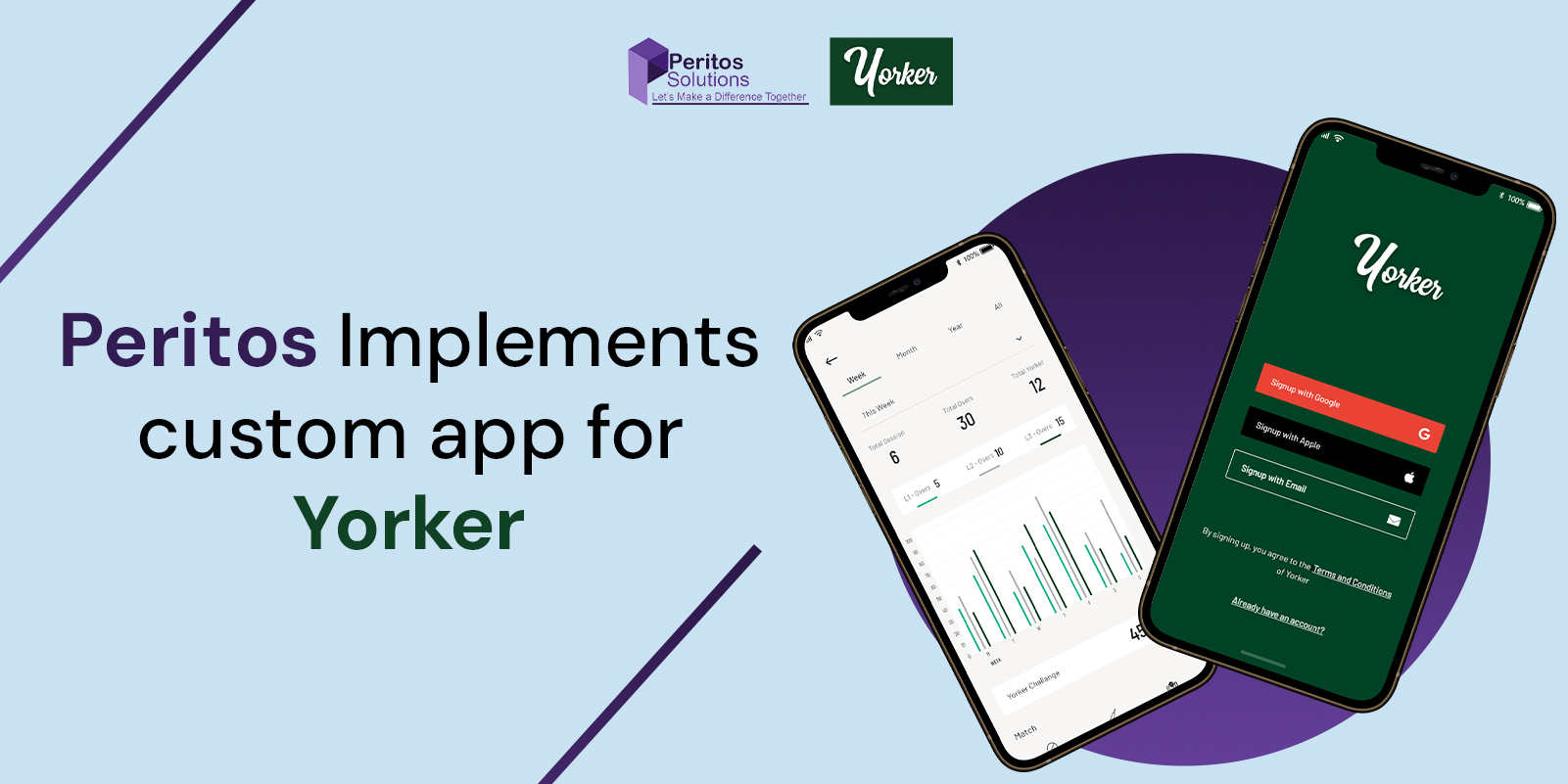
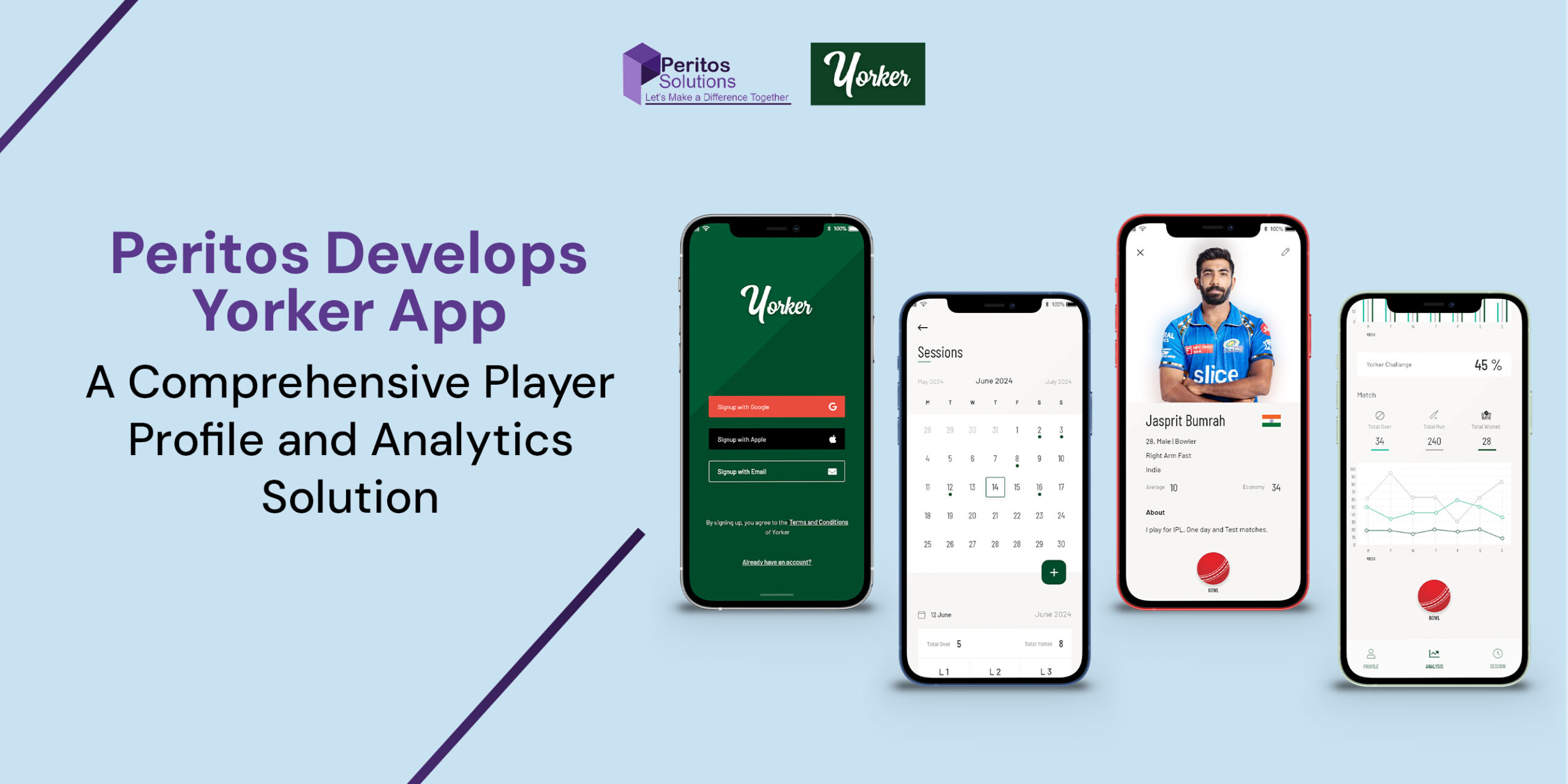
The client, Yorker, is focused on leveraging technology to address the challenge of tracking and managing cricket bowlers’ net practice bowling loads. Recognizing the risk of overtraining and injuries from improper tracking, Yorker aims to provide a digital solution tailored for cricket players. In addition, an AWS Custom Application for Yorker empowers bowlers to automate session recordings, create personalized training plans, and monitor progress effectively. The app also fosters a sense of community by enabling interaction, knowledge sharing, and participation in skill-building challenges. The project is being executed in multiple phases, beginning with a Minimum Viable Product (MVP) to establish a strong foundation for future improvements. Yorker’s commitment to innovation and user-centric design reflects its dedication to transforming how athletes manage their training and optimize performance while minimizing injury risks.
Project Background – Enhancing Cricket Training through Digital Bowling Load Management
The Yorker mobile app project addresses a major challenge for cricket bowlers: accurately tracking and managing their bowling loads during net practice. Without proper tracking, bowlers risk improper training regimens, leading to overtraining and injuries. The Yorker app offers a digital solution that automates session recordings, capturing key metrics like delivery count, types of deliveries, and intensity levels. Additionally, the app allows bowlers to create personalized training plans, track progress, and receive real-time alerts to avoid overexertion. By leveraging technology, this initiative not only helps reduce injury risks but also fosters a sense of community. Bowlers can share experiences, learn from experts, and engage in skill-enhancing challenges. Ultimately, the app aims to optimize performance while ensuring bowlers train safely and efficiently.
Scope & Requirement for AWS Custom Application For Yorker
Scope:
The first phase of the Yorker mobile application focuses on developing a Minimum Viable Product (MVP) to establish a strong foundation. This phase delivers core functionalities to help cricket bowlers start tracking their training sessions and managing their profiles.
- User Authentication: Secure login and registration functionality.
- Profile Management: Basic user profile setup.
- Bowling Record Tracking: Automated session recording.
- Basic Reporting: Simple progress reports.
Requirements:
- Mobile App Development: React Native (iOS & Android).
- Backend Services: .NET with REST APIs.
- Database: RDS Aurora PostgreSQL.
- CI/CD Pipeline: Automated deployment setup.
- UI Design: User-friendly and intuitive interface.
Implementation
Technology and Architecture for AWS Custom Application For Yorker
Read more on the technology and architecture used for AWS Custom Application Development.
Technology
- WAF, API Gateway, Lambda Functions, RDS, S3, CloudWatch, Secrets Manager
Scalability
- The app is designed to run on serverless services, allowing automatic scaling based on usage.
Integrations
The application leverages RESTful APIs for smooth data transfer between the front end and back end, facilitating user authentication, session tracking, and profile management. Future integrations may include cloud-based analytics and third-party push notifications to enhance user engagement.
Cost Optimization
Peritos helped optimize costs for Yorker by designing an efficient AWS architecture using auto-scaling, right-sized instances, and serverless technologies. With tools like AWS Cost Explorer and Trusted Advisor, we continuously monitored and reduced spending. Automation through CI/CD pipelines and code optimization further enhanced performance while lowering operational costs.
Backup and Recovery
A robust backup strategy, using Amazon S3, prevents data loss, while automated recovery processes ensure quick restoration in case of failure.
Features of AWS Custom Application For Yorker
- Automated Bowling Session Tracking
Capture and record each bowling session, including the number of deliveries, delivery types, and intensity levels, providing players with a detailed log of their training activities. - Personalized Training Plans
Create and customize training plans tailored to individual fitness levels and goals. Players and coaches can adjust these plans based on real-time performance data. - Progress Monitoring & Alerts
Track progress with dashboards and alerts to prevent overexertion and injuries. - User Profile & Simple Reporting
Maintain training history, generate reports, and gain insights to improve performance.
Challenges with AWS Custom Application For Yorker
- Accurate Data Capture & Tracking
Ensuring reliable recording of bowling metrics like delivery type, count, and intensity in real-time. - Scalability & Performance
Handling increasing users and large data volumes while maintaining performance. - User Engagement & Retention
Encouraging consistent usage through community features and gamification. - Cross-Platform Compatibility
Ensuring smooth experience across iOS and Android devices with proper testing.
Support
As part of the project implementation, we provide 2 months of ongoing extended support. Additionally, this includes 20 hours per month of development for minor bug fixes, along with an SLA to cover any system outages or high-priority issues.
Next Phase
We are now looking at the next phase of the project, which involves:
- Ongoing support and addition of new features every quarter, along with minor bug fixes.
- Social & community-building features.
About Client
Landcheck provides an easy and affordable way to access natural hazard risk information for properties in Auckland.
The data is sourced from official providers and summarized into a clear, easy-to-read PDF report.
This helps users make informed decisions when investing in Auckland real estate.
Project Background – AWS Custom Application Development using ESRI ArcGIS
Peritos collaborated with Landcheck to develop a custom AWS-based application integrated with ESRI ArcGIS to generate hazard reports for specific properties.
The application generates land-based reports based on property addresses, covering hazards such as flooding, wind, liquefaction, coastal erosion, and active faults.
Reports are created using the latest authorized data and expert insights, enabling users to make informed decisions.
Previously manual, this process was transformed into a scalable SaaS-based solution.
Scope & Requirement
In the first phase of development, the implementation included:
- Custom application to generate automated reports for property addresses in the Auckland region
- Integration with ArcGIS server to fetch hazard data and apply additional risk calculation logic
- User-friendly presentation of hazard risks with expert insights from Landcheck SMEs
- Property aerial images with hazard layers showing coverage by risk levels
- Reports including problem description, hazard percentage, and possible solutions
- Option to download reports as PDF files
Implementation
Technology and Architecture
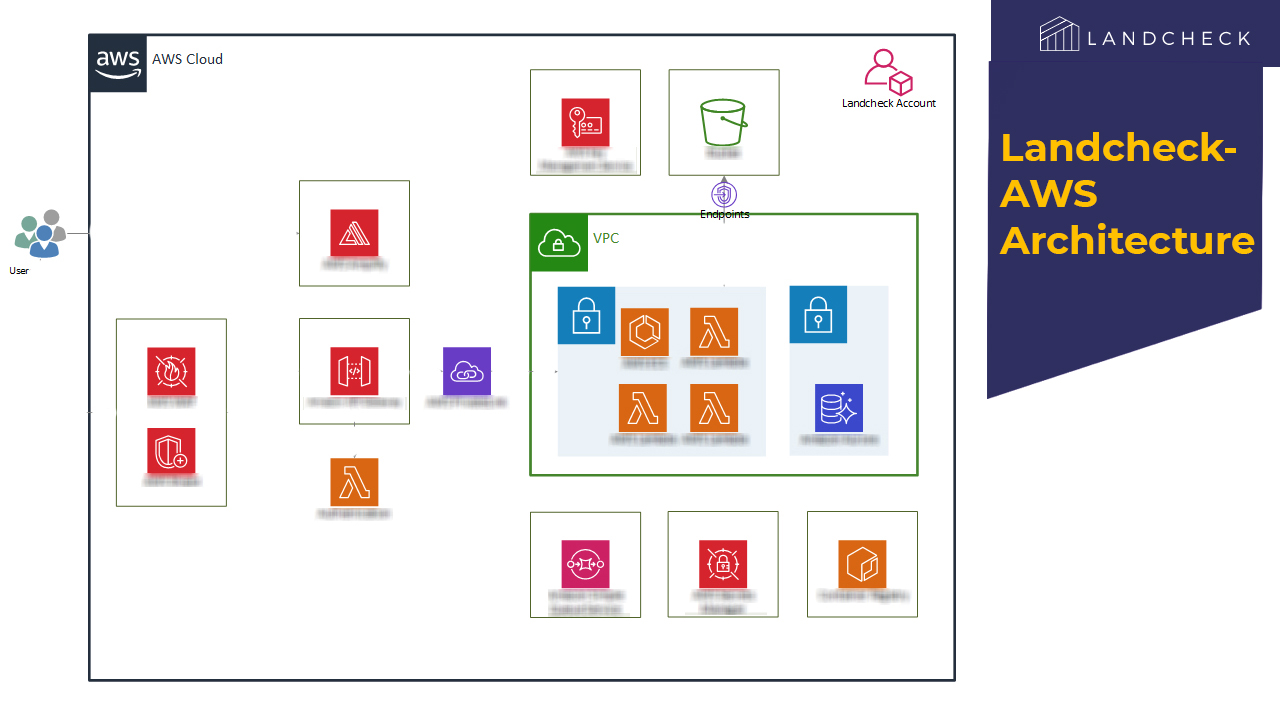
Read more on the technology and architecture used for AWS Custom Application Development using ESRI ArcGIS.
Technology
- Backend: .NET Core, C#
- Frontend: ReactJS
- Database: PostgreSQL
- Cloud: AWS
Integrations
- Google APIs
- LINZ database
- ESRI ArcGIS
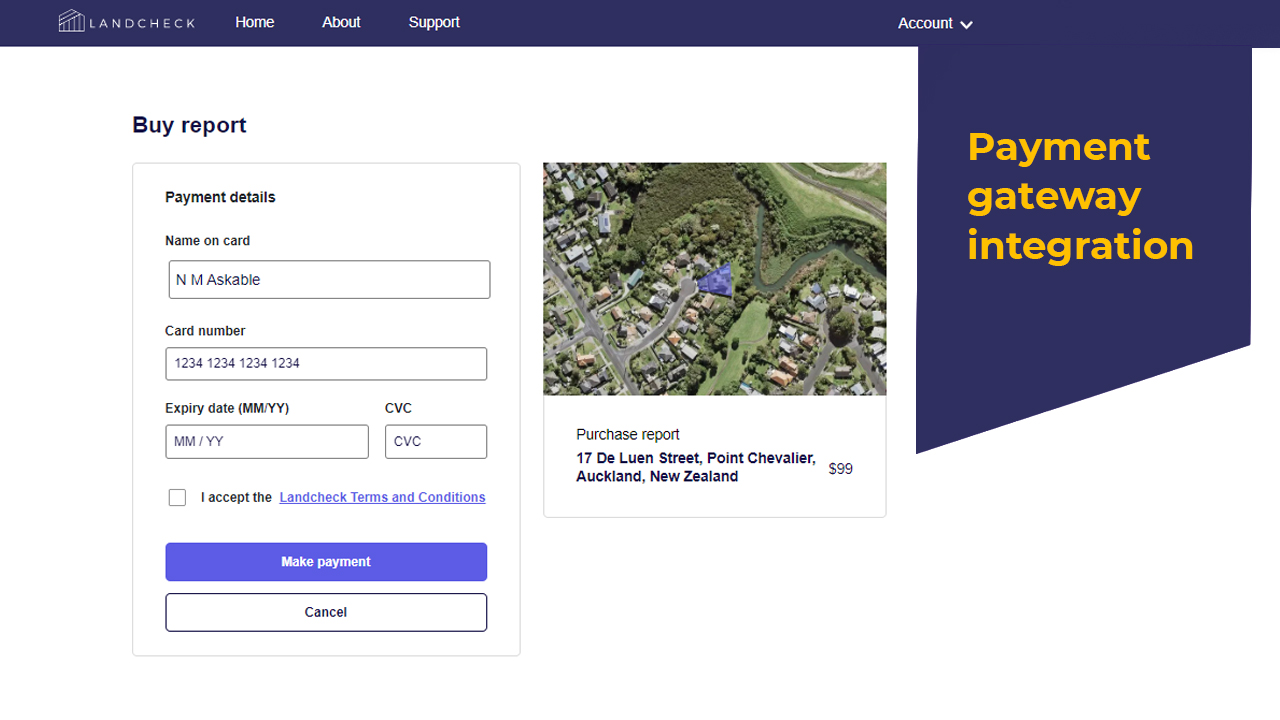
- Stripe
- Auth0
- SendGrid
Security
- AWS WAF used as firewall
- All API endpoints are token-based
Responsive Design
- Designed with mobile-first approach and responsive UI
Scalability
Application runs on serverless architecture, enabling automatic scaling based on usage.
Cost Optimization
Alerts and notifications monitor AWS budget usage. Serverless setup avoids extra cost during low usage,
with continuous cost optimization.
Backup and Recovery
- Automated backups with multiple copies stored
Code Management, Deployment
- CI/CD implemented for automatic build and deployment
Features of Application
- Search and view property outline via aerial view
- User account creation and payment for report access
- Hazard ratings with expert recommendations
- Fully powered by AWS backend and frontend services
Challenges
- Complex multi-source data processing for hazard reports
- Optimized calculations using parallel processing and ArcGIS APIs
- Extensive testing across ~600 properties
- Handling data inconsistencies and edge cases
- ArcGIS data integration from multiple sources
- Complex visualization using layered GIS data
Support
As part of the project implementation, we provide 2 months of extended support, including 20 hours per month for minor bug fixes and development.
An SLA is also in place to handle system outages and high-priority issues.
Next Phase
We are now looking at the next phase of the project which involves:
- Ongoing support with quarterly feature enhancements and minor bug fixes
- Expanding support to more New Zealand cities
About Client
Tonkin + Taylor operates in environmental consulting and meteorological services, providing high-resolution meteorological data for applications such as air quality analysis, weather forecasting, and climate risk assessment.
Their solutions are built around advanced data modeling using the Weather Research and Forecasting (WRF) model, which requires significant computational resources to generate detailed datasets.
Project Background – AWS Custom Product for Weather Research Forecasting
Peritos was engaged to develop a comprehensive system that could:
- Efficiently run the WRF model using an HPC cluster
- Automatically create and manage HPC cluster jobs based on incoming data requests
- Automatically manage data resolution adjustments
- Provide a seamless user experience through an easy-to-use online platform
- Enable commercialization of datasets across multiple use cases
Implementation
Technology and Architecture
The architecture of this application efficiently handles the computational intensity of the WRF model, scales dynamically based on demand, and delivers a seamless user experience. The integration of AWS services ensures the solution is robust, secure, and scalable.
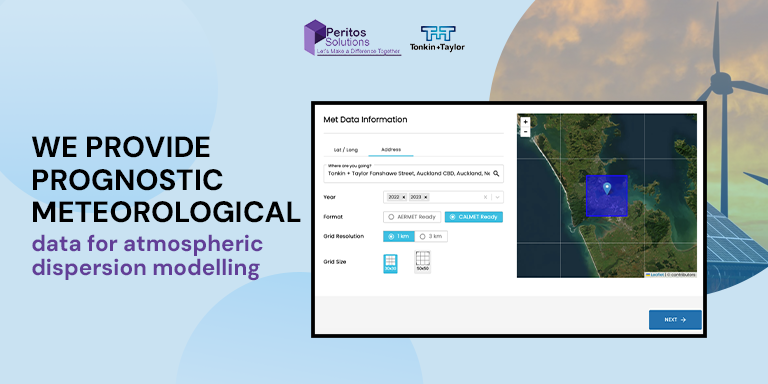
Overall Workflow
- User Request: Users input data parameters, review pricing, and proceed with purchase.
- Processing Trigger: Workflow starts after payment confirmation.
- WRF and WPS Processing: ParallelCluster performs computations to generate meteorological data.
- Post-Processing: Additional processing is applied before storing final output.
- Download and Notification: Users receive notification and download link.
Technology
- Backend: .NET, C#, Python
- Frontend: Next.js
- Database: PostgreSQL
- Cloud: AWS
Integrations
- Google APIs
- Stripe
- Auth0
- SendGrid
- Slurm APIs
Cost Optimization
Designed a cost-efficient and scalable AWS architecture using ParallelCluster, Lambda, Step Functions, S3, and FSx for Lustre.
This enabled on-demand scaling, reduced infrastructure costs, and improved cost visibility.
High-Performance Computing (HPC) Environment
- AWS ParallelCluster dynamically handles WRF and WPS workloads
- Head node manages compute fleet execution
Processing and Orchestration
- AWS Lambda: Handles workflow steps
- AWS Step Functions: Manages orchestration, state, and error handling
Features of Application
- Generates and distributes high-resolution meteorological data using AWS
- User interface hosted on AWS Amplify with WAF and Shield security
- Processing orchestrated via Lambda and Step Functions with ParallelCluster
- Storage via FSx for Lustre, S3, and Aurora DB
- Post-processing on EC2 with notifications via SNS
Challenges
- High Computational Demand: Required large-scale compute resources for WRF model
- Solution: Implemented AWS ParallelCluster with dynamic job handling using Lambda and Step Functions
- User Experience & Commercialization: Needed a user-friendly platform for data purchase
- Solution: Built web portal using AWS Amplify, secured with WAF, Shield, and API Gateway
Next Phase
We are now planning the next phase of the project, which includes:
- Ongoing support with quarterly feature updates and minor bug fixes
- Expansion to support additional countries
Executive Summary
About Client
Machineroad was started by Mitch Ferguson and Lockie Fergsuon both on top of thier cricketing skills and with the right knowledge and tools helping others in developing the game skills is what they wanted to do in Machineroad. With the mobile application goal was to help athletes to see how fast they can bowl and the areas for thier improvement. The competition in the sports sector is cut-throat and this app helps amateur as well as professional athletes to up their games.
https://www.machineroad.com/
Location: Auckland, New Zealand
Project – AI ML based mobile app for cricket training
Machineroad requirement was for implementing a bespoke AI ML based mobile app that helps to improve cricket bowling skills for their users. They wanted an app that helps their users to measure their bowling speed and creates a trajectory image snippet for the end user which further helps to understand the areas of improvement. Machineroad needed detailed analytics to help the users see their activities and compare results each week and month to help keep a track on the progress made. The requirement for AI ML based mobile app for cricket training was to be launched on both iOS and Android Store.
The Founder of MachineRoad Lockie Ferguson as world class cricket champion had this vision in mind ‘We want to bridge the gap between talent and success as a sportsman. Regardless of your upbringing we want you to be able to compete on the world stage and become the best athlete you can be”
Scope & Requirement
Below was the scope of work to develop a Cricket Training app:
- User should be able to download the app from Play and Google store if the device meets the specific requirement of camera and Video processing.
- User can then calibrate and start taking video when doing bowling and the app guides on the right placement and setup so as to get the most accurate video for processing and calculating the speed.
- AI and ML based video processing to give accurate results for the speed and if it there are issues like objects etc detected on the video it then informs the user that speed could not be calculated.
Implementation
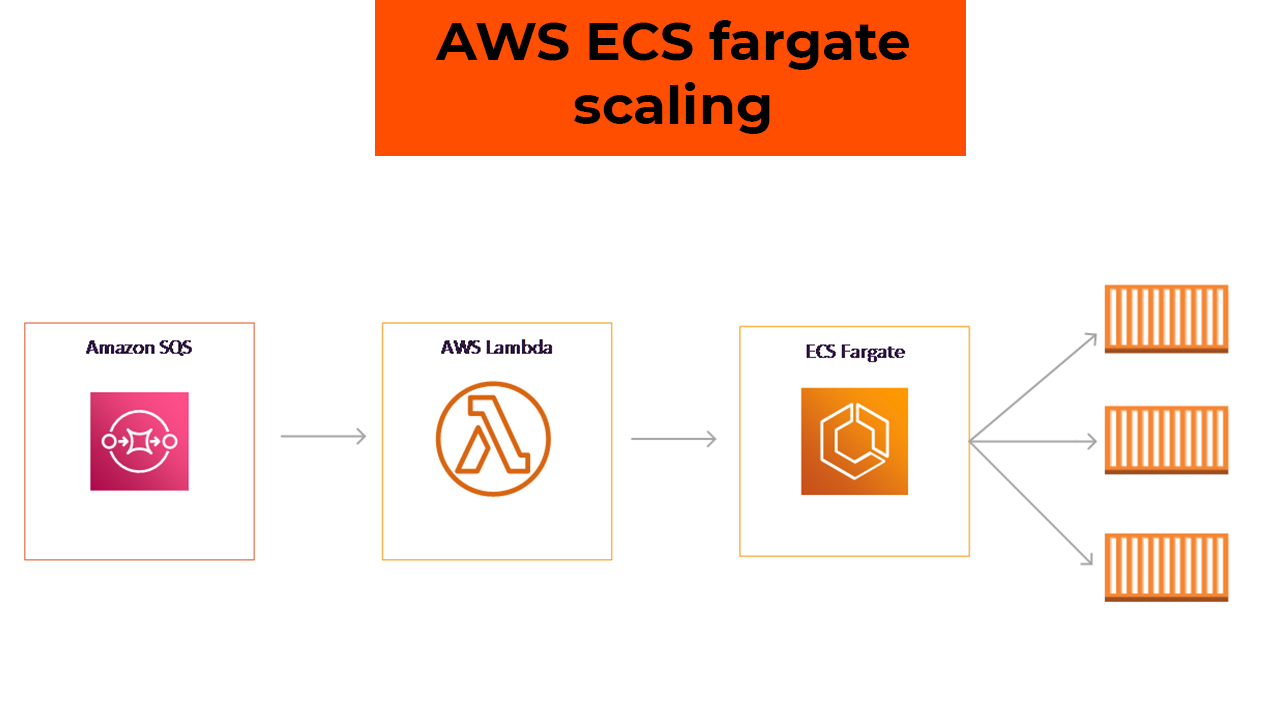
Technology and Architecture
Technology
- The Mobile app was deployed with the below technological component
- Backend Code: .NET Core, C#, Node.js
- Mobile App code: Native Android, Native iOS
- Database: SQL Server, MongoDB
- Cloud: AWS
Integrations
- Single Sign-on using Auth0
- Sendgrid for sending email notifications
- Single Sign-on using Auth0
Security
- Data Encryption
- Multi-Factor Authentication for Admin, Teacher, and Students
- All API endpoints are tokenized
Backup and Recovery
Cloud systems and components used in the attendance management system are secure and 99.99% SLA.
HA/DR mechanism is implemented to create service replicas.
Scalability
Application is designed to scale up to 10x the average load from the first 6 months,
with auto-scaling cloud resources.
Cost Optimization
Alerts and notifications are configured to monitor budget usage. The environment is actively managed
to optimize costs.
Code Management & Deployment
Code for the app is handed over through Microsoft AppCenter.
CI/CD is implemented to automatically build and deploy code changes.
Features of AI ML Based Mobile App for Cricket Training
- Users can create bowling videos, store data, and add it to their player profile on the Machineroad app.
- The app records bowling speed, line, length, and trajectory, saving images and videos for each session.
- Detailed analytics reports allow weekly and monthly progress comparison, including benchmarking with other users and professional athletes.
- Monthly subscription includes comparison charts and leaderboard submission for speed and videos.
- AI/ML-based video processing analyzes recordings and delivers speed accuracy comparable to a speed gun.
- Social media integration enables users to share training results, badges, and streaks.
- Gamification and leaderboard features motivate users with customizable performance targets.
Challenges – AI ML Based Mobile App
- Achieving accurate results with a single camera compared to hawk-eye systems using multiple cameras was challenging.
- Performance depended on background noise, camera position, and device quality.
- App restricted usage on devices without 240FPS or slow-motion support; supported device list was provided.
- Processing videos across varying environments, lighting conditions, and pitches was complex.
- ML models required training across multiple scenarios, but adapting to new locations and pitches remained difficult.
- Accurate camera alignment and orientation were essential for reliable results.
- Help screens and video tutorials were implemented to guide users for optimal usage.
Support
As part of the project implementation, we provided 1 month of extended support, including major and minor bug fixes.
Additional long-term support was also provided for select issues over the years.
Next Phase – AI ML Based Mobile App
We are currently planning the next phase of development and are in the POC stage.
- Video post-processing will be performed directly on the mobile device to deliver faster results to users.
- New features will be implemented and released as part of the ongoing support agreement.
Executive Summary
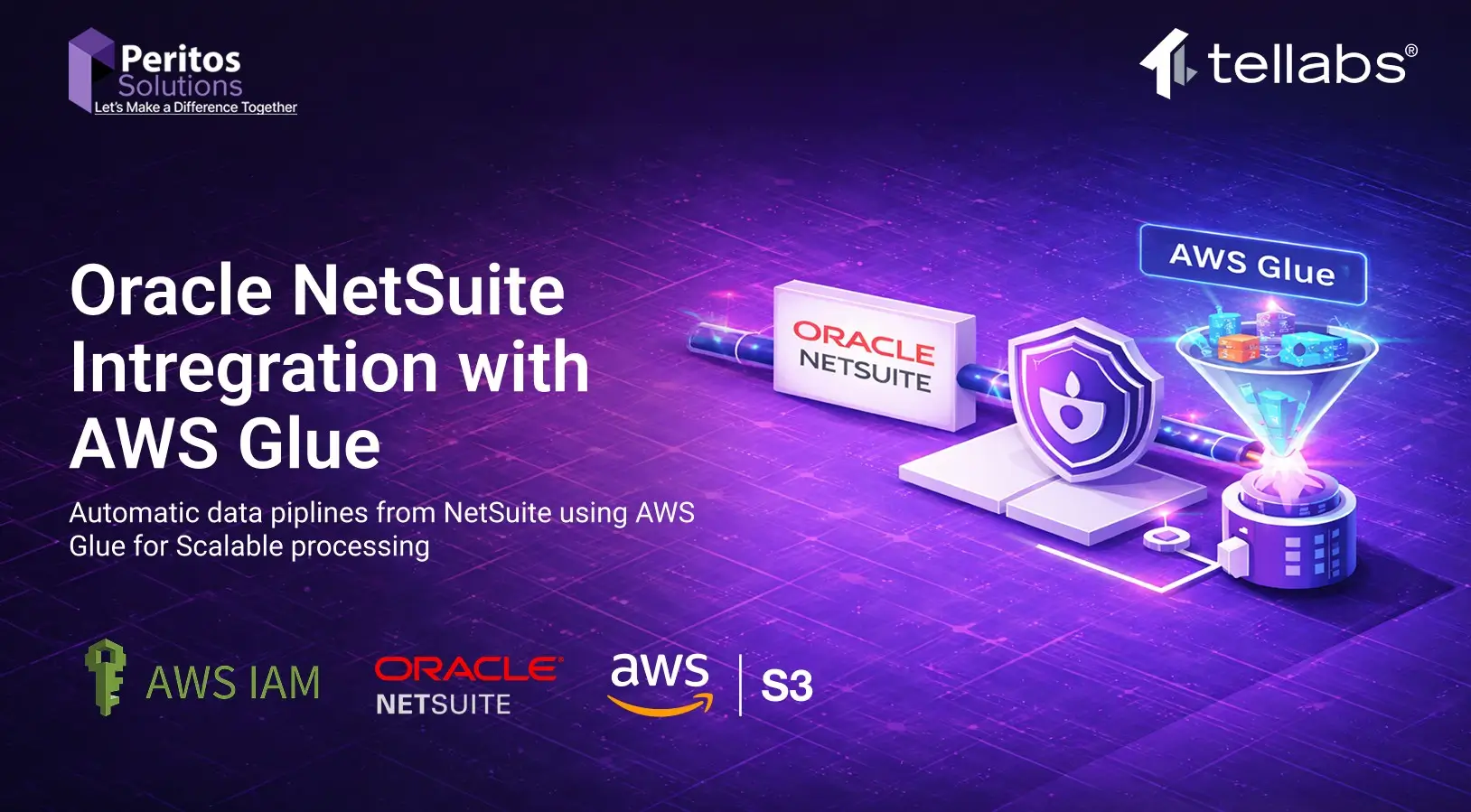
The Tellabs AWS Glue integration project was designed to establish a secure, scalable, and automated data integration pipeline between Oracle NetSuite and AWS. Leveraging AWS Glue, Amazon S3, and orchestration services such as Step Functions and EventBridge, the solution ensures efficient data extraction, transformation, and storage. The Objective was to build and implement automated ETL pipelines to ensure key reporting metrics are improved in terms of speed and accuracy.
A strong emphasis was placed on security, governance, monitoring, and automation, ensuring that all workloads align with AWS best practices. The implementation provides enhanced visibility, operational resilience, and cost optimization for data processing workflows.
About Client
Tellabs is a technology-driven organization requiring secure and scalable cloud infrastructure to support its data integration and analytics workloads. The customer needed a robust AWS-based solution to handle data ingestion from Oracle NetSuite while maintaining strict governance, security, and compliance standards.
Objectives
- Establish a secure AWS account governance model
- Enable seamless integration with Oracle NetSuite
- Implement automated ETL pipelines using AWS Glue
- Ensure high availability and performance monitoring
- Maintain secure access control and identity management
- Enable cost visibility and optimization for Glue jobs
Scope of Engagement
- AWS Account Setup & Governance
- Identity & Access Management (IAM / SSO)
- AWS Glue ETL Pipeline Development
- Monitoring & Logging Framework
- Network Security Implementation (VPC, SG, NACL)
- Deployment Automation using CloudFormation
- Cost Analysis & Optimization
- Runbook Creation & Operational Support
Architecture Overview
The architecture consists of:
- Source System: Oracle NetSuite
- Processing Layer: AWS Glue
- Storage Layer: Amazon S3
- Orchestration: AWS Step Functions & EventBridge
- Secrets Management: AWS Secrets Manager
- Monitoring: Amazon CloudWatch & CloudTrail
This architecture ensures scalability, automation, and secure data processing pipelines.
Solution Overview – To implement automated ETL pipelines using AWS Glue
The solution integrates Oracle NetSuite with AWS using Glue-based ETL pipelines. Data is extracted, transformed, and stored in S3, enabling downstream analytics and reporting.
Key capabilities:
- Automated ETL workflows
- Event-driven execution using EventBridge
- Secure credential handling via Secrets Manager
- Centralized logging and monitoring
- Scalable serverless architecture
Security & Governance
AWS Account Governance SOP
- Root account restricted to initial setup only
- Mandatory MFA enabled on root account
- Use of corporate email & contact details
- CloudTrail enabled across all regions
- Logs stored in secure S3 bucket with deletion protection
Identity & Access Management
- Principle of Least Privilege
- Use of IAM roles & temporary credentials
- Integration with AWS SSO / Active Directory
- No wildcard permissions in policies
- Individual access accountability
Network Security (VPC)
- Security Groups for controlled traffic
- Subnet-level control via Network ACLs
- Restricted DB access to application layer only
- Controlled internet access pathways
Data Security
- Encryption using AWS KMS CMKs
- SSL/TLS for data in transit
- Key rotation enabled
- Fine-grained access control policies
Implement automated ETL pipelines using AWS Glue and ensure to manage Security and Access control
Monitoring & Logging
- CloudWatch Dashboards for:
- Glue job performance
- Step Functions execution
- EventBridge events
- CloudTrail for audit logging
- Logs exported to Amazon S3
- SNS alerts for:
- Job failures
- Latency spikes
- Credential access issues
Implement automated ETL pipelines using AWS Glue and ensure monitoring and Observability by automating data pipelines
Implementation
Infrastructure as Code
- AWS CloudFormation used for:
- Infrastructure provisioning
- Security configurations
- Networking setup
CI/CD Automation
- Integrated with AWS CodeBuild
- Automated deployment pipeline
- No manual console changes
Glue Implementation – automated ETL pipelines using AWS Glue
- ETL jobs configured with optimized DPUs
- Logging enabled for all executions
- Job performance tracked via CloudWatch
Runbook & Troubleshooting
Routine Monitoring Tasks
- Monitor AWS Lambda execution metrics
- Check API Gateway latency & security logs
- Review Aurora DB performance metrics
Troubleshooting Scenarios
Lambda Errors
- Analyze CloudWatch logs
- Adjust timeouts/configurations
API Gateway Latency
- Identify backend bottlenecks
- Optimize integrations
Aurora DB Issues
- Optimize queries & indexing
- Resolve connection bottlenecks
High Latency Scenario (OPE-001)
- Trigger incident response
- Identify root cause
- Apply performance optimizations
Deployment Readiness Checklist
Testing
- Unit Testing
- Integration Testing
- System Testing
- User Acceptance Testing (UAT)
Automation
- CI/CD pipelines
- Automated testing frameworks
- Security & code quality scans
Documentation
- Deployment guide
- Rollback strategy
- Configuration records
Validation
- Pre & post deployment checks
- Deployment checklist completion
- Evidence of successful rollout
Cost Optimization & Performance Tuning for running and implementing automated ETL pipelines using AWS Glue
- Glue pricing based on DPU usage & runtime
- Cost analysis using:
- CloudWatch logs
- AWS Cost Explorer
- Optimization strategies:
- Reduce over-allocated DPUs
- Use Glue Python shell jobs for smaller workloads
- Enable job bookmarks to avoid reprocessing
- Automation via:
- boto3 scripts
- Athena-based reporting
Challenges & Resolutions
| Challenge | Resolution |
| Secure access management | Implemented IAM roles & SSO |
| Monitoring complexity | Centralized CloudWatch dashboards |
| Cost visibility | Implemented tagging & cost analysis |
| Data security compliance | Used KMS CMKs & encryption |
| Deployment consistency | Adopted CloudFormation IaC |
Project Completion
- Successfully deployed automated ETL pipelines
- Established secure AWS governance model
- Enabled real-time monitoring and alerting
- Improved performance and reduced operational risks
- Delivered scalable and maintainable architecture
Note
This implementation follows AWS best practices for:
- Security
- Reliability
- Performance Efficiency
- Cost Optimization
- Operational Excellence
Implement automated ETL pipelines using AWS Glue high-level system setup.
Reference Links
https://docs.aws.amazon.com/prescriptive-guidance/latest/patterns/build-an-etl-service-pipeline-to-load-data-incrementally-from-amazon-s3-to-amazon-redshift-using-aws-glue.html
Read more about Glue
https://aws.amazon.com/glue/
Read more here about our services
AWS Glue Services
- https://www.peritossolutions.com/services/aws-glue-serverless-data-integration/
AWS consulting Services
- https://www.peritossolutions.com/aws-consulting
About Client
1Place is a technology-driven organization focused on leveraging data to enhance decision-making, reporting, and operational intelligence. The company manages a growing data ecosystem comprising multiple data sources, analytics tools, and business applications. AWS offers glue as a fully managed etl service
To address scalability challenges and improve data automation, 1Place collaborated with Peritos Solutions, an AWS Advanced Consulting Partner, to design and implement a serverless data platform using AWS Glue. The goal was to replace manual data workflows with a secure, automated ETL framework that ensures accuracy, consistency, and governance.
Project Background – Data Modernization through AWS Glue ETL service
1Place data operations were previously dependent on traditional ETL tools that lacked automation and flexibility. These manual processes caused data silos, inconsistent data quality, and delayed reporting.
Peritos Solutions proposed an AWS Glue-based serverless ETL framework to transform 1Place data landscape. The solution automated schema detection, data cataloging, and transformation pipelines while ensuring end-to-end visibility through AWS CloudWatch and centralized governance.
This transformation allowed 1Place to manage large-scale data workloads with minimal operational overhead while maintaining compliance, traceability, and cost efficiency.
Objectives of the Engagement
- Establish a serverless, automated data integration framework using AWS Glue ETL service
- Replace legacy ETL pipelines with scalable and efficient Glue jobs
- Implement centralized metadata management using AWS Glue Data Catalog.
- Enable cross-service data integration with S3, RDS, and Redshift.
- Ensure security, governance, and compliance through IAM, encryption, and monitoring.
Scope & Requirements
Scope
The project’s scope included the design, deployment, and optimization of AWS Glue components to enable seamless data flow across 1Place AWS environment.
Key deliverables included:
- AWS Glue Crawlers for automated schema detection.
- Glue Jobs for data transformation and enrichment.
- Glue Workflows for end-to-end orchestration.
- Centralized Data Catalog for metadata governance.
- CloudWatch monitoring and alerting integration.
Requirements
Functional:
- Automated ETL pipeline creation and scheduling.
- Dynamic schema detection and updates.
- Integration with Amazon Redshift and Athena for analytics.Non-Functional:
- Serverless architecture for scalability.
- Secure access control with IAM.
- Centralized monitoring and auditing.
- Cost efficiency and fault tolerance.
AWS Glue ETL service Implementation support for Pipeline Automation
Solution Overview -AWS Glue ETL service
Business Problem Addressed
1Place existing ETL infrastructure was time-intensive and not scalable. Manual intervention led to delays, higher costs, and inconsistent data quality.
Proposed AWS Glue-Based Solution
Peritos Solutions implemented an end-to-end AWS Glue solution integrating multiple data sources and automating data transformation and cataloging. Using Glue Crawlers, Jobs, and Workflows, the entire ETL process became event-driven, reducing human intervention and operational latency.
Key Benefits
- Serverless data integration with zero infrastructure management.
- Automated data discovery and schema management.
- Faster and more reliable data transformation pipelines.
- Improved data governance through centralized metadata.
- Seamless analytics enablement through Athena and QuickSight integration.
Implementation -AWS Glue ETL service
Architecture Overview
The architecture consisted of:
- Data Sources: S3, RDS, and on-premises data via secure connectors.
- ETL Layer: AWS Glue Crawlers, Jobs, and Workflows.
- Data Catalog: Centralized schema and metadata management.
- Analytics Layer: Athena and QuickSight for visualization.
- Monitoring & Logging: CloudWatch for logs, metrics, and alerts.
Technology Stack
- AWS Services: Glue, S3, RDS, Redshift, CloudWatch, Lambda, Secrets Manager, IAM.
- Security: KMS encryption, MFA-enabled IAM roles, and cross-account logging.
- Automation: CI/CD pipelines with AWS CodePipeline and CodeBuild.
AWS Glue Components Implemented
- Glue Crawlers: Automated schema discovery for S3 and RDS datasets.
- Glue Jobs: ETL scripts built using PySpark to clean, normalize, and enrich data.
- Glue Workflows: Orchestration for dependency-based execution.
- Data Catalog: Managed metadata, table schemas, and data lineage.
- Triggers: Event-driven execution using CloudWatch and EventBridge.
Security and Compliance
- IAM policies applied with least privilege.
- Glue roles restricted to authorized services only.
- KMS encryption applied for data at rest and in transit.
- CloudTrail enabled for audit trails and compliance verification.
Runbook and Troubleshooting Scenarios
Routine Operational Tasks
- Daily monitoring of Glue job metrics and DPU utilization.
- Reviewing failed job logs and rerunning based on SLA thresholds.
- Verifying Data Catalog updates and schema integrity.
- Checking Glue job triggers and workflow dependencies.
Common Troubleshooting Scenarios
- Job Failures Due to Schema Drift: Re-run Glue Crawler, refresh Data Catalog, and update ETL script mapping.
- Performance Degradation: Tune Spark configurations and increase DPU allocation.
- Connection Errors: Validate IAM permissions, VPC configurations, and network paths.
- Data Quality Issues: Use Glue dynamic frames and AWS Deequ for validation.

AWS Glue ETL service Implementation support
Deployment Readiness Checklist
Testing
- Unit, integration, and system testing of all Glue jobs.
- Validation of schema mapping, data accuracy, and job success rates.
Automation
- CI/CD pipelines integrated for job versioning and automated deployment.
- Security scans embedded in build pipelines.
Documentation
- Deployment runbook, rollback plan, and configuration details maintained.
Monitoring & Validation
- Glue job metrics and alerts verified in CloudWatch.
- Post-deployment validation ensured job stability.
Evidence: Deployment logs, Glue job screenshots, and automation reports attached to project documentation.
Cost Optimization and Performance Tuning
- Used Glue 3.0 for faster job performance and improved scaling.
- Optimized DPU allocation and job parallelism.
- Leveraged job bookmarks for incremental data loads.
- Enabled data partitioning in S3 for query efficiency.
- Monitored spend through AWS Cost Explorer and adjusted scheduling.
Challenges and Resolutions
| Challenge | Resolution |
| Schema evolution from multiple data sources | Automated schema updates via Glue Crawlers |
| Long-running ETL jobs | Spark job optimization and dynamic partitioning |
| Data duplication in catalogs | Automated Data Catalog cleanup and versioning |
| Integration with legacy databases | Implemented secure JDBC connections and Glue connections |
| Monitoring job failures | Integrated CloudWatch alerts with email/SNS notifications |
Project Completion – AWS Glue ETL service
Deliverables
- AWS Glue Data Catalog, Crawlers, Jobs, and Workflows.
- CloudWatch dashboards for Glue performance monitoring.
- Operational Runbook and Troubleshooting Guide.
- Deployment Readiness Checklist and Evidence Reports.
- CI/CD pipelines for Glue job automation.
Support
Post-implementation support for two months, including 20 hours/month of operational support, bug fixes, and performance optimization.
Next Phase
- Integrate with AWS Lake Formation for enhanced data governance.
- Implement data lineage tracking and metadata versioning.
- Expand to real-time streaming ETL using AWS Glue and Kinesis.
- Develop monitoring dashboards using QuickSight for Glue job analytics.
- Conduct quarterly optimization reviews for cost and performance improvements.
AWS Glue ETL service Implementation support
Reference Links AWS Glue ETL service
https://docs.aws.amazon.com/prescriptive-guidance/latest/patterns/build-an-etl-service-pipeline-to-load-data-incrementally-from-amazon-s3-to-amazon-redshift-using-aws-glue.html
Read more about Glue
https://aws.amazon.com/glue/
Read more here about our services
AWS Glue Services
- https://www.peritossolutions.com/services/aws-glue-serverless-data-integration/
AWS consulting Services
- https://www.peritossolutions.com/aws-consulting


