
O365 Usage Report

O365 Usage Report

This blog talks about you should check your O365 Usage Report so that you can renew your licenses based on your usage and save yourself money.

O365 Usage Reports

Introduction- O365 Usage Report

In this blog, we will talk about O365 Usage Reports. It is very simple to obtain the O365 Usage Reports. All you have to do is log in to the admin panel and then follow a few steps to obtain your usage report. Read the blog to understand the steps.

Project Background

This project was all about understanding how to check your different licenses using the Admin Centre access in Microsoft to obtain the O365 Usage Report.

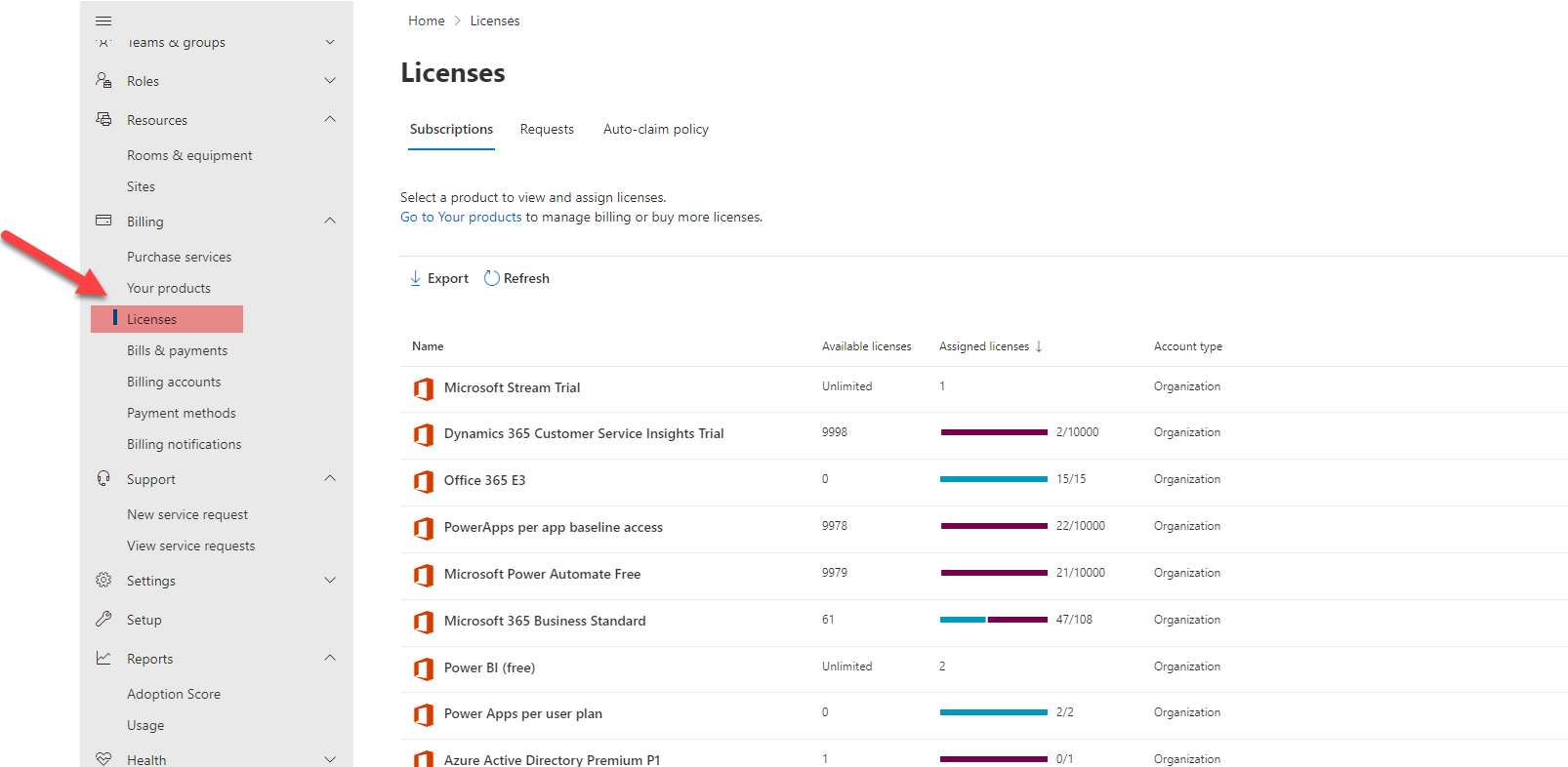
You can find the list of licenses under the admin center licenses section as seen below:

Licenses – Microsoft 365 admin center

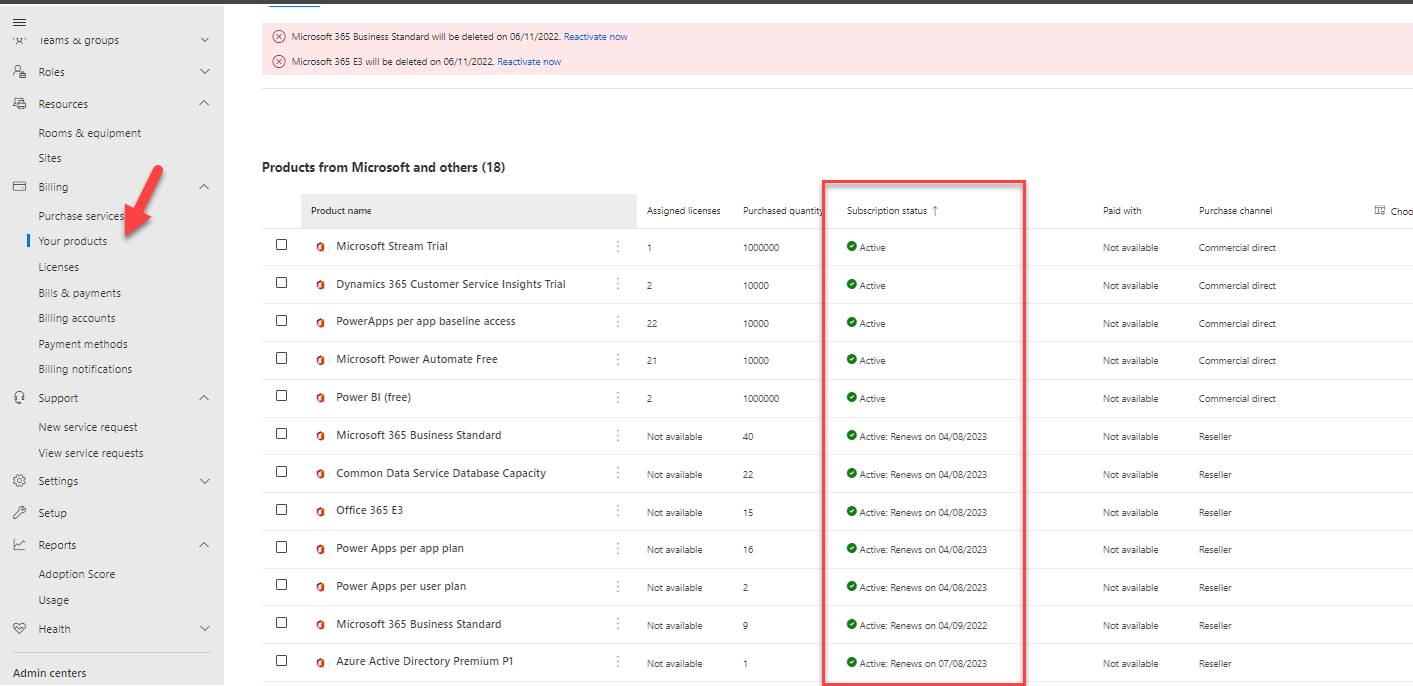
After logging in, navigate to “Your Products” to check your active licenses.

There it will show you the listed subscriptions.

Subscriptions – Microsoft 365 admin center

Note: Some of them are monthly, others are yearly. You can see this based on renewal date.

As you see below it shows:

  1. Business standard 40- Renewed yearly
  2. Office 35 E3 15- Renewed yearly
  3. Microsoft 365 business standard 9- Renewed monthly
Graphical user interface, application Description automatically generated

O365 Usage Report

To further drill down the report, you should check its usage.

Here in the link below we see a few of the charts.

Usage – Microsoft 365 admin center

Check the 60 Active users list where it shows the number of unique Active users per Microsoft 365 Service, and then click on view more to see the user wise report.

O365 Usage Report For Individual User

In this report it can be seen how we could drill down further for per user report.

Steps to follow are as below:

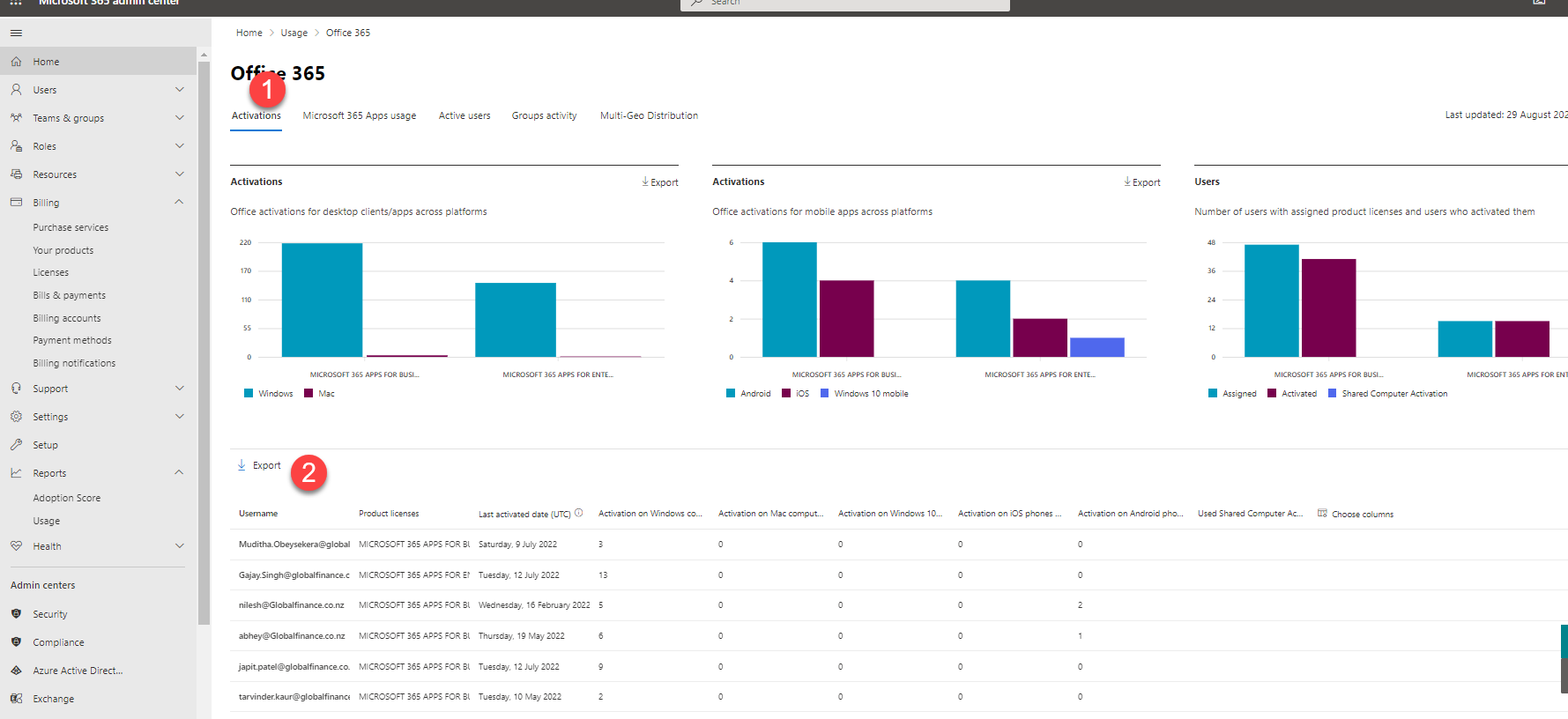
  1. Go to the Activation Tab that shows the table for User extract below
  2. Use another report called Active users

After that, click on Activation and export the list.

Graphical user interface Description automatically generated

Find the active users and “Last activity date for exchange” and VLOOKUP, and add this to the report.

We have assumed here, if the user does not use the organization email that means the user is active in the system or not. Based on clients input, this license can then be saved.

Conclusion- O365 Usage Report

We now have the report with the User name and Activity last date for exchange.

You can easily see how people in your business are using Microsoft 365 services. For example, you can identify who is using a service a lot and reaching quotas, or who may not need a Microsoft 365 license at all, and you could get rid of the license in the next month billing accordingly to save costs.

Proud Blogs that
make us stand
out

Marketing and Feedback Terms and Conditions Recent Home

Terms & Conditions

Marketing and Feedback Terms and Conditions

General Terms and Conditions

SAP Fieldglass Resume Ranking setup Recent Home

S/4 Hana

SAP Fieldglass Resume Ranking setup

Ensure seamless SAP Integration | Secure Access | Auth0 with third-party APIs. Secure authentication &…

Peritos Wins Globalisation Excellence Award | MSME Star Stories 2024 Recent Home

Awards

Peritos Wins Globalisation Excellence Award | MSME Star Stories 2024

Peritos Solutions is proud to be a winner in the “Globalisation Excellence” category at MSME…

Peritos Wins at NABH Quality Connect Fiesta 2024 Recent Home

Awards

Peritos Wins at NABH Quality Connect Fiesta 2024

Peritos proudly receives the NABH Quality Connect Healthcare Quality Pitch Award at the 2024 Competitions…

Peritos: New Zealand ICT Award Finalist for Technical Award 2025 Recent Home

Awards

Peritos: New Zealand ICT Award Finalist for Technical Award 2025

Peritos Solutions has been named a finalist for the 2025 New Zealand ICT Technical Award,…

Thinking about a project? Get in touch with us.

Connect with Us Today through the Details Below or Fill
Out the Form for a Prompt Response

Book Free Consultation

Guaranteed response within 8 business hours.


    Trusted by Startups and Fortune 500 companies

    07+ years of experience

    We can handle projects of all complexities.

    100+ satisfied customers

    Startups to Fortune 500, we have worked with all.

    20+ in-house team

    Top 1% industry talent to ensure your digital success.