How to get O365 on a discounted Price

How to get O365 on a discounted Price

The blog provides the users an guidance on How to get an O365 discounted price via an authorized partner.

How to get O365 on a Discounted Price

O365 at a discounted price, in association with Peritos

Microsoft O365 discounted price of subscription involves the most collaborative, up-to-date features in one seamless integrated experience. Office 365 lets you disseminate mailboxes, calendars, and contacts and edit documents in real time via collaborative tools. Let’s go through some more features of O365 below:

  • With Microsoft 365 you get the most contemporary version of Office 365 office apps, like Word, Excel, PowerPoint, and Outlook, Windows 10, and best-in-class security.
  • It supplies the ability to install PCs, Macs, tablets, and phones with an added 1 TB of OneDrive cloud storage. Providing feature updates and upgrades not available anywhere else.
  • Microsoft Teams lets your team organize and have conversations all in one place. Sharing calendars in an exchange indicates that you can see who in your organization is available when, so you can organize meetings that work for everyone, the first time round.
  • Office 365 securely protects your files in the cloud with OneDrive, so you can get to them from anywhere.
  • You can store any type of file including spreadsheets, images,  presentations, and more, then share and work in real-time with your coworkers, no matter if you are in the office or on the go.

Now the question arises that where to get Office O365 at a cheap cost. All the O365 plans are subscription based, paid for either monthly or perennial. With a little foresightedness, you can always use Microsoft’s Office subscription at a deep discount.

Why procure from Microsoft Authorized Partner for O365 Discounted Price?

There are a lot of unscrupulous vendors distributing shared or misappropriated accounts, and even if they work, you won’t be able to use them with your existing Microsoft account. Avoid buying from international sellers too and watch out for the shipping price. Most sellers don’t tack on a shipping fee, but some do.

Compared to other entrusted partners, Peritos provides 300$ cloud credit, expert advice, and O365 up to a 10% ongoing discount every year  than going via Microsoft, which is the cherry on the cake for businesses.

Make sure that, when you are buying the list of subscriptions, it encloses a picture of the product advertising a one-year subscription for one person, and that the authorized partner, that is undoubted, Peritos, has a large number of positive feedback ratings.

In a nutshell:O365 discounted price

Hope you keep organized and connected with the mobile apps on your devices through the latest features of O365. And stay productive from any browser with Office for the web with the features and services provided by Peritos as an authorized partner with Microsoft. Collaborate and work from anywhere and on any device with Microsoft 365. Just remember to repeat this process once per year and you should be able to enjoy Microsoft O365 at a deep discount for years to come, with us providing great credits and discounts.

Don’t miss out on our latest offers. Click on the buttons below to get in touch with us.

For more information and services: https://www.peritossolutions.com/newdev.peritossolutions.com/services/microsoft-development-and-consulting-services/

For more:https://www.microsoft.com/en-in/microsoft-365/business/compare-all-microsoft-365-business-products?&activetab=tab:primaryr2

Proud Blogs that
make us stand
out

SAP Fieldglass Resume Ranking setup Recent Home

S/4 Hana

SAP Fieldglass Resume Ranking setup

Ensure seamless SAP Integration | Secure Access | Auth0 with third-party APIs. Secure authentication &…

Choosing the Right O365 Subscription: Monthly, Annual & Hybrid Commitments Recent Home

sub -O365

Choosing the Right O365 Subscription: Monthly, Annual & Hybrid Commitments

This article explores the various Microsoft 365 subscription models—monthly, annual, and hybrid—and helps you choose…

Peritos Wins Globalisation Excellence Award | MSME Star Stories 2024 Recent Home

Awards

Peritos Wins Globalisation Excellence Award | MSME Star Stories 2024

Peritos Solutions is proud to be a winner in the “Globalisation Excellence” category at MSME…

Peritos Wins at NABH Quality Connect Fiesta 2024 Recent Home

Awards

Peritos Wins at NABH Quality Connect Fiesta 2024

Peritos proudly receives the NABH Quality Connect Healthcare Quality Pitch Award at the 2024 Competitions…

Peritos: New Zealand ICT Award Finalist for Technical Award 2025 Recent Home

Awards

Peritos: New Zealand ICT Award Finalist for Technical Award 2025

Peritos Solutions has been named a finalist for the 2025 New Zealand ICT Technical Award,…

Thinking about a project? Get in touch with us.

Connect with Us Today through the Details Below or Fill
Out the Form for a Prompt Response

Book Free Consultation

Guaranteed response within 8 business hours.


    Trusted by Startups and Fortune 500 companies

    07+ years of experience

    We can handle projects of all complexities.

    100+ satisfied customers

    Startups to Fortune 500, we have worked with all.

    20+ in-house team

    Top 1% industry talent to ensure your digital success.

    Removing former employee O365

    Removing former employee O365

    The blog enables employers with quick easy steps to remove former employee O365 when someone leaves the organization.

    Removing former employee O365

    Best Practices in O365 User management when someone leaves your organization

    This article talks about removing former employee O365 from the management of O365 Licenses when a user leaves the organization. The recommended process below ensures that we do not need to attach an ongoing license to a user and still comply with the retention period policy for storing emails from the user who has left the organization.

    1. Remove user license
    2. Move Mailbox from the user who is leaving the organization to a common mailbox where all such emails can be dumped
    3. Either delete the user or deactivate as needed

    Steps with screenshot mentioned below

    Best Practices: Removing former employee O365

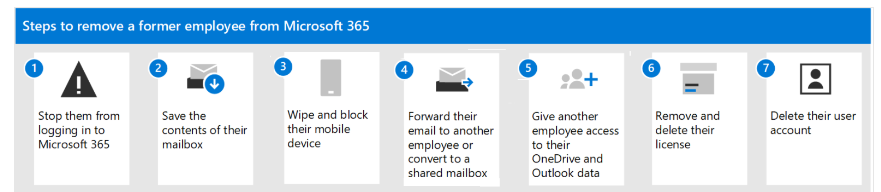
    Microsoft recommends follow a 7 step process as below when someone leaves the organization
    Removing former employee O365

    Steps to Migrate mail inbox from one user to another

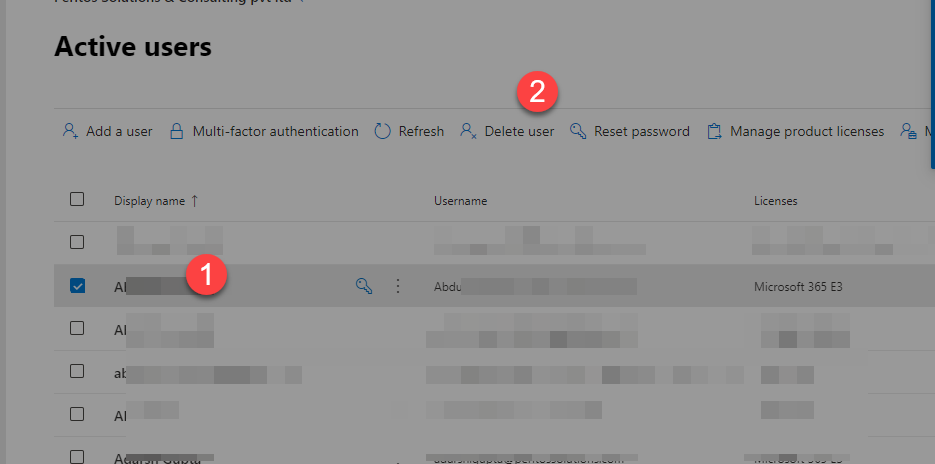
    From admin center select the user and click on Delete
    Removing former employee O365

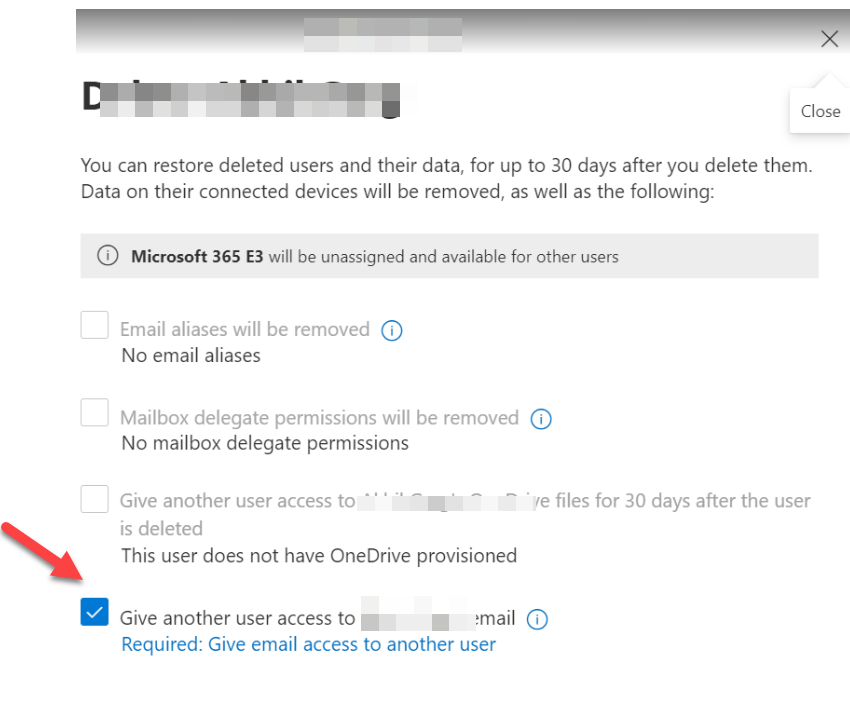
    It would give below options select the option to give email access to another user
    Removing former employee O365

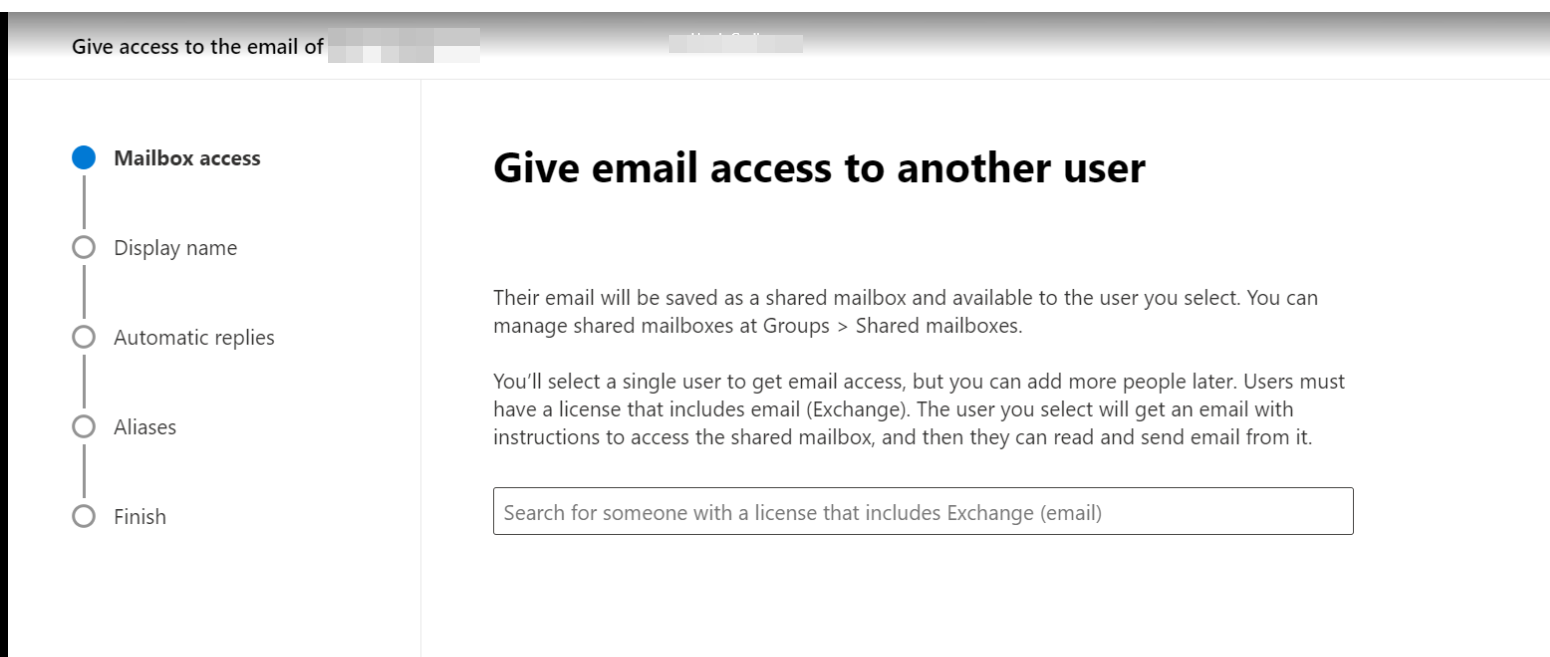
    Select the mailbox where you need all emails to go
    Removing former employee O365

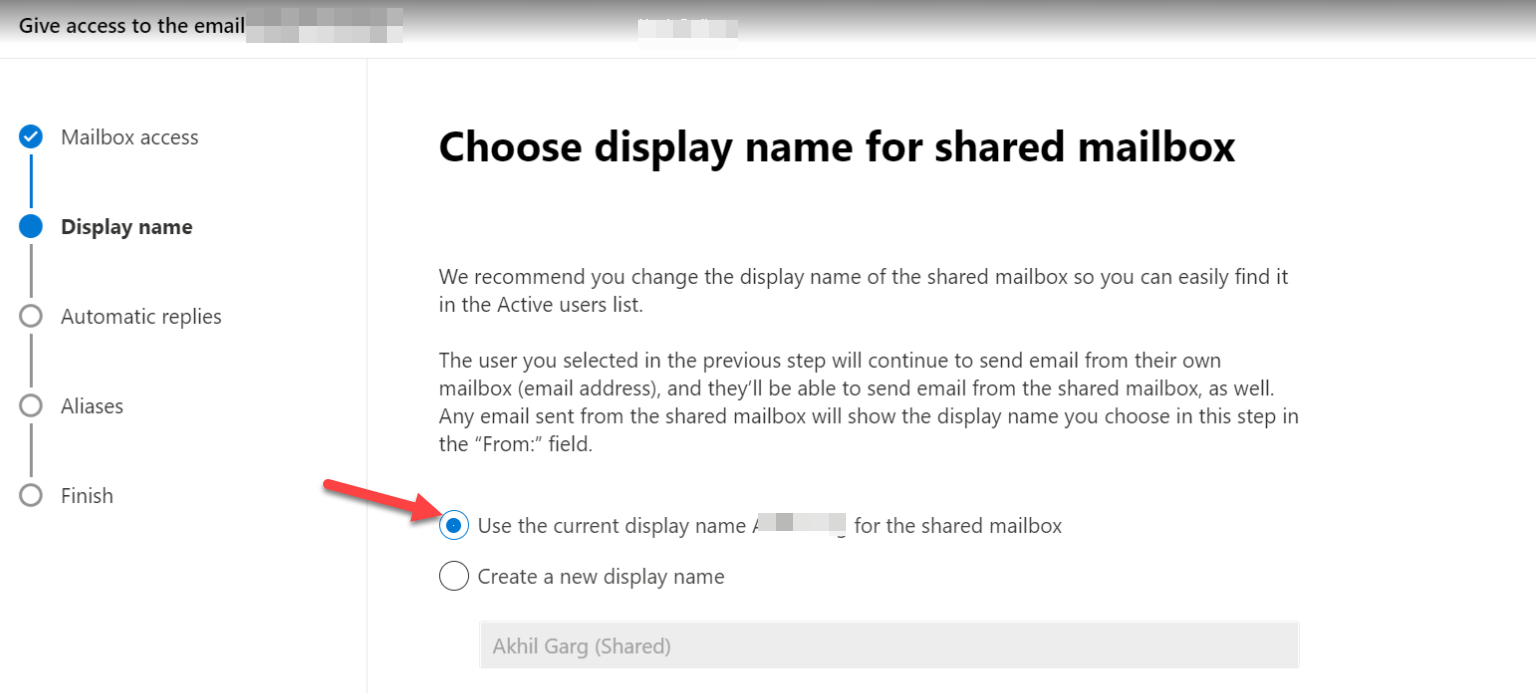
    Add a display name for shared mailbox which should be the same as that of the user so it is easier to identify
    Removing former employee O365

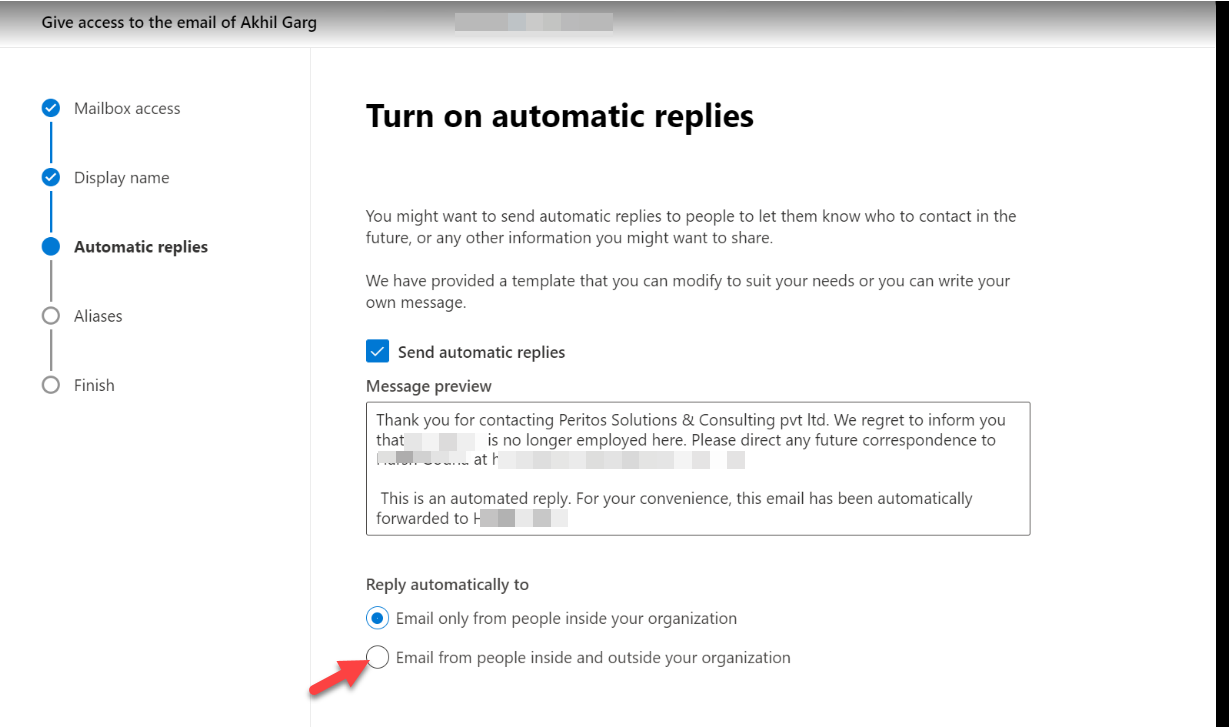
    You can add and apply automatic replies for both email from inside or outside of the organization, or only inside. We recommend choosing the option for both inside and outside.
    Removing former employee O365

    If any aliases for the user those would also be deleted
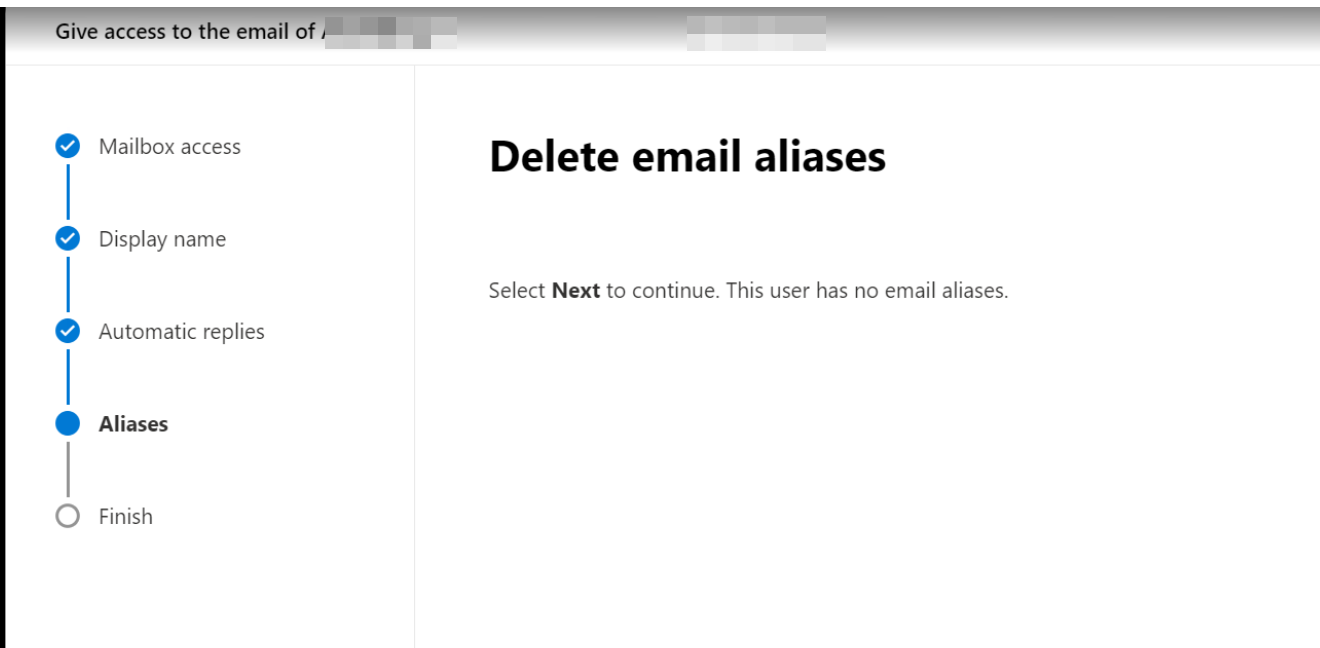
    Removing former employee O365

    Review and finish the email mailbox after reviewing all settings
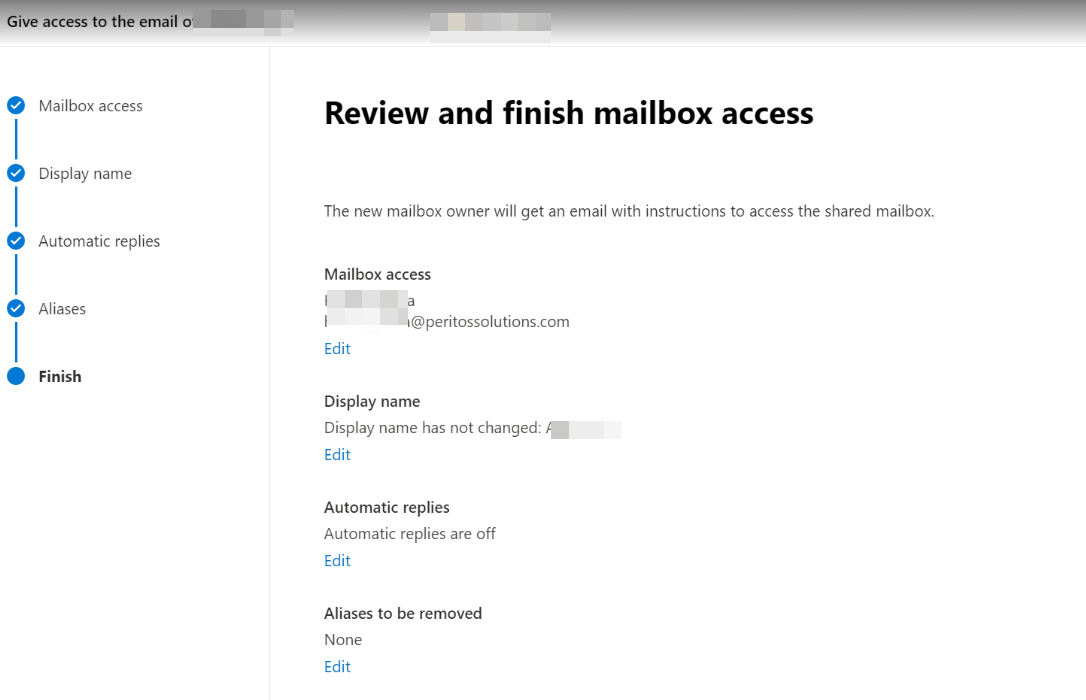
    Removing former employee O365

    Avoid these mistakes while Removing former employee O365

    1. If you do not stop them from signing in, then they can continue accessing their emails which could be lead to business information being leaked or misused.
    2. If you only remove a user’s license but don’t delete the account, the content in the user’s OneDrive will remain accessible to you even after 30 days but If you do not continue to use that data after 30 days of deletion it would be lost forever
    3. Licenses are not named so when you remove a license, you can assign it to someone else. Or, you can delete the license so you don’t pay for it until you hire another person. So remove the license after the mails and Onedrive are migrated

    References: Removing former employee O365

    https://docs.microsoft.com/en-us/microsoft-365/admin/add-users/remove-former-employee?view=o365-worldwideThe recommended process below ensures that we do not need to attach an ongoing license to a user and still comply with the retention period policy for storing emails from the user who has left the organization

    Proud Blogs that
    make us stand
    out

    SAP Fieldglass Resume Ranking setup Recent Home

    S/4 Hana

    SAP Fieldglass Resume Ranking setup

    Ensure seamless SAP Integration | Secure Access | Auth0 with third-party APIs. Secure authentication &…

    Choosing the Right O365 Subscription: Monthly, Annual & Hybrid Commitments Recent Home

    sub -O365

    Choosing the Right O365 Subscription: Monthly, Annual & Hybrid Commitments

    This article explores the various Microsoft 365 subscription models—monthly, annual, and hybrid—and helps you choose…

    Peritos Wins Globalisation Excellence Award | MSME Star Stories 2024 Recent Home

    Awards

    Peritos Wins Globalisation Excellence Award | MSME Star Stories 2024

    Peritos Solutions is proud to be a winner in the “Globalisation Excellence” category at MSME…

    Peritos Wins at NABH Quality Connect Fiesta 2024 Recent Home

    Awards

    Peritos Wins at NABH Quality Connect Fiesta 2024

    Peritos proudly receives the NABH Quality Connect Healthcare Quality Pitch Award at the 2024 Competitions…

    Peritos: New Zealand ICT Award Finalist for Technical Award 2025 Recent Home

    Awards

    Peritos: New Zealand ICT Award Finalist for Technical Award 2025

    Peritos Solutions has been named a finalist for the 2025 New Zealand ICT Technical Award,…

    Thinking about a project? Get in touch with us.

    Connect with Us Today through the Details Below or Fill
    Out the Form for a Prompt Response

    Book Free Consultation

    Guaranteed response within 8 business hours.


      Trusted by Startups and Fortune 500 companies

      07+ years of experience

      We can handle projects of all complexities.

      100+ satisfied customers

      Startups to Fortune 500, we have worked with all.

      20+ in-house team

      Top 1% industry talent to ensure your digital success.