
CRM Debugging and BOL Programming to read & populate values
This article talks about CRM Debugging and BOL Programming and how you could navigate the entity structure in CRM to read and update values.
This article is a follow up article from the 1st one in CRM Debugging and BOL Programming. Please refer to the last article if you haven’t already for CRM Debugging and BOL Programming.
- Requirement: To disable one specific field in an Address section
- Then find the UI component
- Find technical object to do code changes
- Get value using IF_BOL_BO_PROPERTY_ACCESS
- Debug to find where the value is coming from
- Then simply get value of UI field using me-> context type
- Debug to find how this gets populated.
Requirement: Disable a specific UI element field on CRM Debugging and BOL Programming
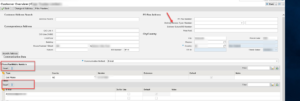
For customer overview screen when user clicks on edit to update the address information
Disable a specific field called “Delivery service type” and then do not allow to update Phone and email sections as highlighted below.

Find the UI component
UI component was BP_ADDR
And then View value as BP_ADDR/AccountAddressEF

Find Technical object to do code changes on CRM Debugging and BOL Programming
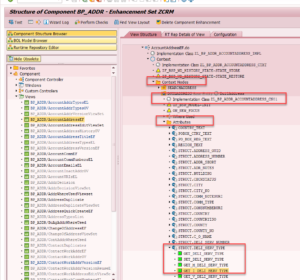
Use transaction obsp_wd_cmpwb to be able to open the component in backend CRM system
Specific fields can be found in
Context_Nodes > Implementation class > Attributes >STRUCT.FIELDNAME

CRM Debugging and BOL Programming to read & populate values

There are different methods that you can find in the context node attributes as was also answered in the post below
- GET_XYZ – This is used to get the data of attribute(XYZ) from the BOL Layer and then display it on the UI
- SET_XYZ – This is used to set the data of the attribute from the UI to the BOL layer
- GET_M_XYZ – This defines the meta data (type) of the attribute
- GET_I_XYZ – This defines whether the attibute is editable or non editable i.e, using Get_I method you can make your field as grade out based up on any condition.
- GET_V_XYZ – This defines the content of drop down values, F4 Help etc i.e,you can retrieve the dropdown values based up on your condition.
- GET_P_XYZ – This defines the property of attribute whether it’s drop down, text box, F4 help, check box etc. Also, if any followup event should trigger the same is mentioned here i.e,you can call specific even handler using P method .
- There are two more methods which have recently got added from the above two as mentioned below
- GET_A_XYZ – This is used to hide or display the attribute based on the Switch ID.
- GET_AC_XYZ – Then this is used for Field Action Menu Getter
- Since I need to make the field disabled, I need to make use of the field value GET_M_DELI_SERV_TYPE
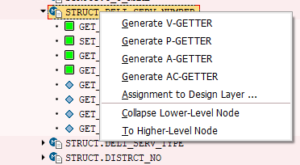
- You can find this method in context node Buildaddress> Attributes> STRUCT.DELI_SERV_TYPE which has a set of predefined methods as seen below
Then the code which was used to set the value as disabled would be GET_I_XYZ
If the icon does not look green as in the above screenshot choose to redefine or one of then options below to activate the method

METHOD get_i_deli_serv_type.
CALL METHOD super->get_i_deli_serv_type
EXPORTING
iterator = iterator
RECEIVING
rv_disabled = rv_disabled.
IF zl_bp_addr_accountaddress_impl=>gv_addr_disabled IS NOT INITIAL.
rv_disabled = zl_bp_addr_accountaddress_impl=>gv_addr_disabled.
ENDIF.
ENDMETHOD.
Get value of UI field using IF_BOL_BO_PROPERTY_ACCESS
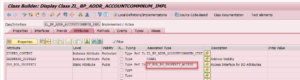
To access a specific value coming from the previous or current screen then use the BOL property access type as mentioned below where you want to read the value from
In my case I am using ZGO_BOL_PROPERTY defined in class ZL_BP_ADDR_ACCOUNTCOMMNUM_IMPL where I want to read the attribute address number and address GUID which are attributes in that class.

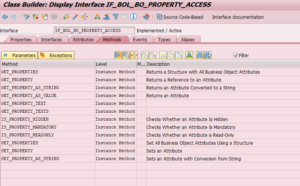
If you check the interface IF_BOL_BO_PROPERTY_ACCESS, it has properties as below:

Additionally, To be able to use the value stored in the property below code needs to be run
In ZL_BP_ADDR_ACCOUNTEMAILSE_IMPL DO_PREPARE_OUTPUT
DATA: lo_bo TYPE REF TO cl_crm_bol_entity,
lv_addr TYPE ad_addrnum,
lv_addr_guid TYPE bu_address_guid.
IF zl_bp_addr_accountcommnum_impl=>zgo_bol_property IS NOT INITIAL .
lo_bo ?= zl_bp_addr_accountcommnum_impl=>zgo_bol_property.
ENDIF.
IF lo_bo IS BOUND .
lo_bo->get_property_as_value(
EXPORTING
iv_attr_name = ‘ADDRESS_NUMBER’
IMPORTING
ev_result = lv_addr
).
lo_bo->get_property_as_value(
EXPORTING
iv_attr_name = ‘ADDRESS_GUID’
IMPORTING
ev_result = lv_addr_guid
).
ENDIF .
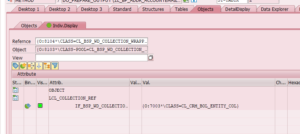
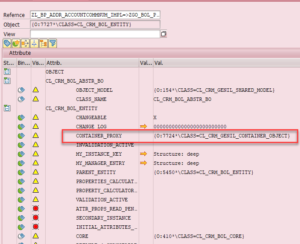
Check in debug mode where the value is coming from
For the implementation class then you can use ZL_BP_ADDR_ACCOUNTCOMMNUM_IMPL=>ZGO_BOL_PROPERTY
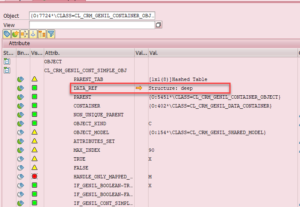
- Go to container_proxy
- Then Go to Data_Ref
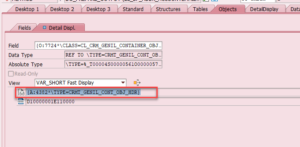
- And then Click on data type which opens up
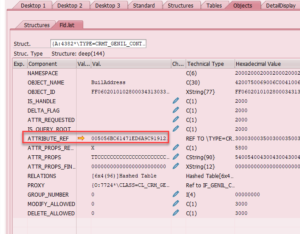
- Open the attribute_ref
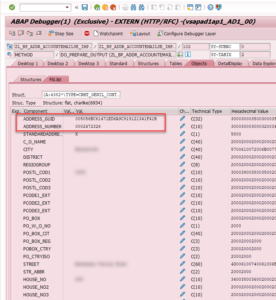
- Then simply Find the address number and address value in there
Find the container proxy

1:Click on Data_ref

2:Then Click on the type below

3:Click on Attribute ref

Then find the values

Get value of UI field using me-> context type
The code using me-> would be calling the context field
ZTYPED_CONTEXT needs to be defined of type ZL_BP_ADDR_ACCOUNTCOMMNUM_CTXT
In the implementation method ZL_BP_ADDR_ACCOUNTCOMMNUM_IMPL
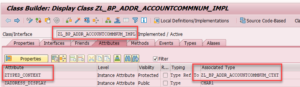
In this case since we have defined a parameter using the context interface as below
DATA: lo_bo TYPE REF TO cl_crm_bol_entity,
lv_addr TYPE ad_addrnum,
lv_addr_guid TYPE bu_address_guid.
lo_bo ?= me->ztyped_context->builaddress->collection_wrapper->find(
iv_index = cl_bp_addr_corpaccountad1_impl=>gv_index
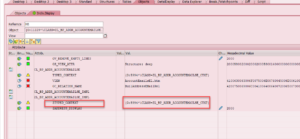
Check in debug mode what value is being sent on CRM Debugging and BOL Programming
ztyped_context->builaddress->collection_wrapper->

Moreover, Insider collection wrapper you would find collection reference
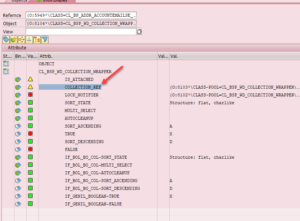
Insider collection reference look for
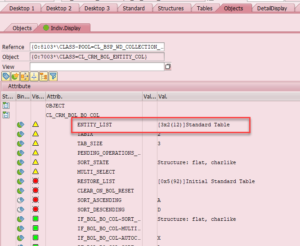

Additionally, Look for entity list as above which shows 3 entries as there are 3 BP addresses on the UI
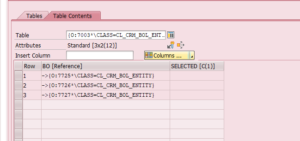
Further, go to one of the entities and it would have container proxy
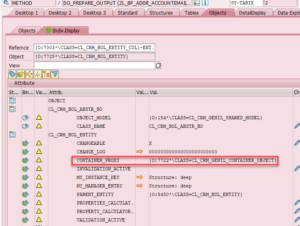
Therefore follow the same steps as in 4.1
- Go to container_proxy
- Then Go to Data_Ref
- And then Click on data type which opens up
- After that Open the attribute_ref
- Then simply Find the address number and address value in there. For more services and information:https://www.peritossolutions.com/newdev.peritossolutions.com/services/sap-consulting-services
Share us
Get A Quote
Proud Blogs that
make us stand out
Recent Home
S/4 Hana
SAP Fieldglass Resume Ranking setup
Ensure seamless SAP Integration | Secure Access | Auth0 with third-party APIs. Secure authentication &…
Recent Home
sub -O365
Choosing the Right O365 Subscription: Monthly, Annual & Hybrid Commitments
This article explores the various Microsoft 365 subscription models—monthly, annual, and hybrid—and helps you choose…
Recent Home
Awards
Peritos Wins Globalisation Excellence Award | MSME Star Stories 2024
Peritos Solutions is proud to be a winner in the “Globalisation Excellence” category at MSME…
Recent Home
Awards
Peritos Wins at NABH Quality Connect Fiesta 2024
Peritos proudly receives the NABH Quality Connect Healthcare Quality Pitch Award at the 2024 Competitions…
Recent Home
Awards
Peritos: New Zealand ICT Award Finalist for Technical Award 2025
Peritos Solutions has been named a finalist for the 2025 New Zealand ICT Technical Award,…
Thinking about a project? Get in touch with us.
Connect with Us Today through the Details Below or Fill
Out the Form for a Prompt Response
Book Free Consultation
Guaranteed response within 8 business hours.
Trusted by Startups and Fortune 500 companies
We can handle projects of all complexities.
Startups to Fortune 500, we have worked with all.
Top 1% industry talent to ensure your digital success.